
An in-depth, independent look at TrueProfit’s features, pricing, and usability — and how it stacks up against BeProfit and Lifetimely.
What’s Inside This Guide
What Is TrueProfit and What Problem Does It Solve?
If you run a Shopify store, you have probably had this experience: Shopify’s own analytics dashboard tells you that you made $50,000 in revenue last month, but it does not tell you how much of that you actually kept. Once you subtract cost of goods sold (COGS), shipping, payment processing fees, ad spend across five different platforms, and a handful of recurring app subscriptions, the real number can look very different — and most merchants only find that out weeks later, after pulling together a messy spreadsheet.
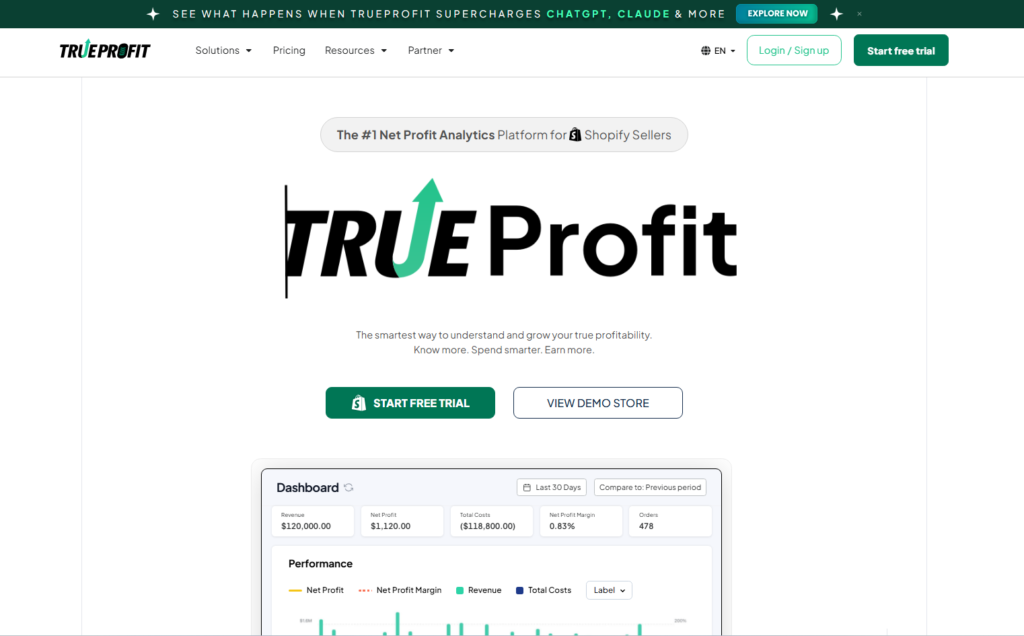
TrueProfit is a profit-analytics app built specifically for Shopify merchants who want to close that gap. Instead of showing gross revenue, it consolidates every cost center that affects your bottom line — product costs, shipping, transaction fees, taxes, and advertising spend — into a single real-time net profit dashboard. The pitch is simple: stop guessing, and see your actual margins as they happen, not at the end of the month.
The app has built a sizable following on the Shopify App Store, where it currently holds a near-perfect rating from several hundred reviews. Merchants frequently mention that it replaces hours of manual spreadsheet work and gives them the confidence to make pricing and ad-spend decisions based on real numbers rather than estimates.
In this review, we break down what TrueProfit actually does, how it feels to use day-to-day, how its pricing compares to competitors like BeProfit and Lifetimely, and ultimately whether it is worth the monthly investment for your store.
Key Features: Real-Time P&L, COGS Tracking, and Ad Spend Tracking
Real-time profit & loss dashboard
The centerpiece of TrueProfit is its live P&L view. Rather than waiting for a monthly export, the dashboard updates continuously as orders come in, automatically netting out the costs you have configured. You can view profit broken down by day, week, month, or any custom date range, and drill into the components — gross sales, discounts, refunds, COGS, shipping, fees, and ad spend — that make up your final net profit figure.
Automated cost and COGS tracking
TrueProfit lets you set product-level costs (including variant-level COGS) once, and the app applies them automatically to every order going forward. It also supports custom fixed or variable expenses — useful for things like software subscriptions, warehousing, or staff costs that do not map neatly to a single order. Transaction fees from Shopify Payments, PayPal, and Stripe are synced automatically, though a few user reviews mention occasional discrepancies with PayPal fee calculations that have not been fully ironed out.
Ad spend tracking across channels
For stores running paid acquisition, this is arguably TrueProfit’s most valuable feature. It connects directly to Facebook, Google, TikTok, Bing, Snapchat, and Amazon ad accounts and pulls spend data in near real time, so you can see ROAS and net profit per channel side by side instead of jumping between five different ad managers and a spreadsheet.
Product-level and customer-level analytics
Beyond the top-line dashboard, TrueProfit’s Product Analytics module ranks SKUs by net profit rather than revenue — a meaningful distinction, since a best-selling product is not always your most profitable one. The app also tracks customer lifetime value (LTV), giving a longer-term view of which acquisition channels bring in customers who are worth the spend over time.
Multi-store view and mobile app
Merchants running more than one Shopify store can view all of them combined in a single dashboard, or switch between individual stores. A free mobile app (iOS and Android) mirrors the web dashboard, which is genuinely convenient for checking margins on the go rather than opening a laptop.
Interface — Is TrueProfit Easy to Use?
Setup is reasonably quick: connecting your Shopify store, payment processors, and ad accounts takes most users under an hour, and the onboarding flow walks you through configuring COGS and shipping costs step by step. Several reviewers on the Shopify App Store specifically praise the interface as intuitive compared to heavier business-intelligence tools like Triple Whale or Polar Analytics, noting that data loads quickly and the dashboard is easy to read without a learning curve.
That said, the experience is not flawless. A recurring complaint in user reviews involves transaction-fee calculations — particularly around PayPal — being computed by formula rather than pulled directly from Shopify, which has occasionally produced inflated or inaccurate fee numbers. Customer support is consistently described as responsive and willing to manually correct data issues, but it does mean some merchants need to actively monitor their numbers rather than trusting the dashboard blindly from day one.
Overall, for a non-technical store owner, TrueProfit’s interface is one of its strongest selling points: clean charts, sensible navigation, and a dashboard that genuinely does save time compared to spreadsheets. Power users wanting deeper customization or raw data export may find it comparatively simple.
Pricing & Comparison with BeProfit and Lifetimely
TrueProfit’s plans start at $35 per month, with higher tiers scaling up toward roughly $200 per month as you add features like multi-store views, team seats, and deeper attribution. A 14-day free trial is available so you can test it against your real store data before committing. It is worth noting that some merchants in reviews have flagged the plans as expensive for very small or early-stage stores, particularly when combined with any usage-based add-ons.
How does that stack up against the two most commonly searched alternatives?
| Feature | TrueProfit | BeProfit | Lifetimely (by Amp) |
| Starting price | From $35/mo | From ~$19-$29/mo | Free tier, paid from ~$29-$149/mo |
| Pricing model | Flat monthly tiers | Flat monthly tiers | Scales with monthly orders/revenue |
| Core focus | Real-time net profit & P&L | Profit & expense tracking | Customer LTV & cohort analytics |
| Ad platform sync | Facebook, Google, TikTok, Bing, Snapchat, Amazon | Multiple major channels | Facebook, Google, Microsoft, Pinterest, Snapchat, TikTok |
| Platforms supported | Shopify only | Shopify, WooCommerce, Wix, Amazon | Shopify, Amazon |
| Mobile app | Yes (iOS & Android) | Limited | No |
| Best for | Brands wanting real-time net profit clarity | Budget-focused stores, multi-platform sellers | Retention-focused, LTV-driven brands |
In short: BeProfit is the budget-friendly option and the only one of the three that extends beyond Shopify to WooCommerce and Wix, making it attractive if you run more than one storefront platform. Lifetimely (now part of the Amp platform) leans hardest into customer lifetime value and cohort analysis, which makes it the strongest pick if retention — not just raw profit — is your primary question. TrueProfit sits in between: more expensive than BeProfit’s entry tier, but with a sharper focus on real-time net profit and a noticeably more polished ad-spend integration across more channels.
Who Should Use TrueProfit?
- Shopify stores spending meaningfully on paid ads across multiple channels (Facebook, Google, TikTok, etc.) who need to see true ROAS, not just ad-platform-reported ROAS.
- Growing DTC brands that have outgrown manual spreadsheets but are not yet ready for an enterprise BI tool like Triple Whale or Polar Analytics.
- Merchants who want a clean, real-time net profit number without building their own reports.
- Multi-store operators who want a consolidated view of profitability across several Shopify shops.
On the other hand, TrueProfit is probably not the right fit if you sell across WooCommerce, Wix, or other non-Shopify platforms (it is Shopify-only), if your single largest priority is deep customer LTV and cohort analysis (Lifetimely is more specialized there), or if you are a very early-stage store with limited monthly revenue, where the $35/month entry price may outweigh the value until sales volume grows.
Build your first sales funnel in 60 minutes with Systeme.io
Final Verdict: 8/10
TrueProfit delivers on its core promise: a real-time, genuinely accurate picture of net profit that most Shopify merchants cannot easily get from Shopify’s native analytics alone. The ad-spend integrations are broad, the product- and customer-level breakdowns are genuinely useful for decision-making, and the interface is approachable enough that you do not need an accounting background to use it well.
Where it loses points: pricing starts higher than some competitors, the platform is locked to Shopify only, and a handful of recurring complaints about fee-calculation accuracy (especially with PayPal) suggest the underlying data pipeline still has room to mature. For stores that are already running paid acquisition across multiple channels and want one dashboard for true profitability, TrueProfit is one of the stronger options on the market in 2026 — just budget for the subscription and double-check your fee numbers during onboarding.
Rating: 8/10 — Strong real-time profit tracking and ad-spend visibility, held back slightly by pricing and Shopify-only availability.