

Table of Contents
The Hostinger VPS vs Cloudways decision looks like a simple price comparison, but it is really a choice between two different philosophies: raw server power at a very low cost, or managed cloud hosting where someone else runs the server for you. I have broken down both options the way a hosting consultant would for a client: by cost, performance, workload, and how much technical work you are willing to take on.
Short answer: choose Hostinger VPS if you want maximum resources per dollar and you are comfortable with some server administration. Choose Cloudways if you want a managed, hands-off setup for WordPress or WooCommerce and you are happy to pay a premium for it. The detail below will help you decide which side you are on.
Hostinger VPS vs Cloudways at a Glance: Quick Comparison Table and Verdict
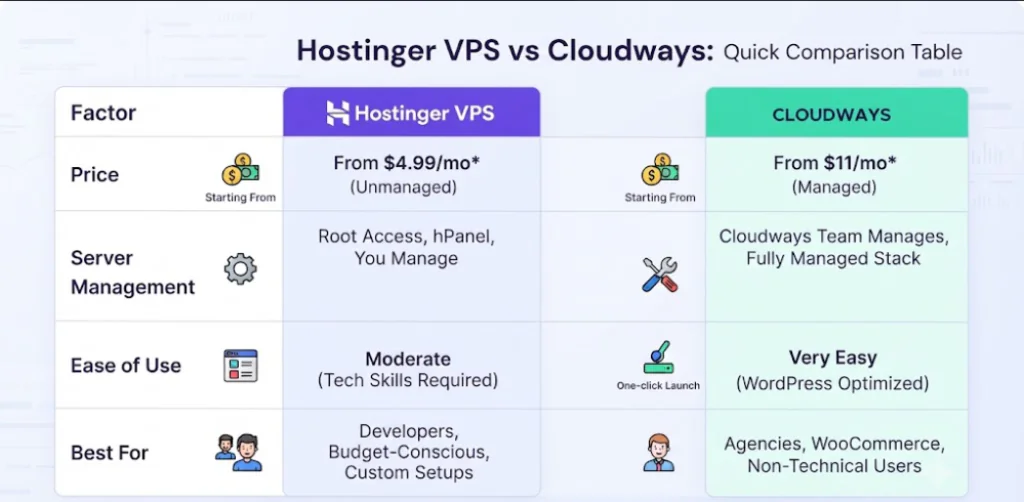
Before going deep, here is the side-by-side view. Prices are approximate and change with promotions, so confirm the live figures on each provider’s pricing page.
| Factor | Hostinger VPS | Cloudways |
| Type of hosting | Unmanaged-style VPS with root access (KVM, NVMe) | Managed cloud hosting layer on top of DigitalOcean, Vultr, Linode, AWS or Google Cloud |
| Entry price (approx.) | From roughly $4-7/month depending on term and promo | From about $11/month, pay-as-you-go |
| Billing | Fixed term, renewal price is higher | Monthly, no long contract |
| Server management | You (or Hostinger’s panel and tools) | Cloudways handles stack, patches, backups |
| Ease of use | Moderate, more control | Very easy for WordPress |
| Best for | Developers, budget builders, multi-project hosts | Agencies, WooCommerce stores, non-technical owners |
The Core Difference: Unmanaged VPS Power vs Managed Cloud Convenience
Hostinger VPS gives you a virtual server with root access, KVM virtualization and NVMe storage. You get generous CPU and RAM for the money, and you decide how to configure it. Cloudways is a managed layer that sits on top of cloud infrastructure providers such as DigitalOcean, Vultr, Linode, AWS and Google Cloud. You pay for the infrastructure plus the convenience of a tuned stack, a dashboard, automated backups and server-level management.
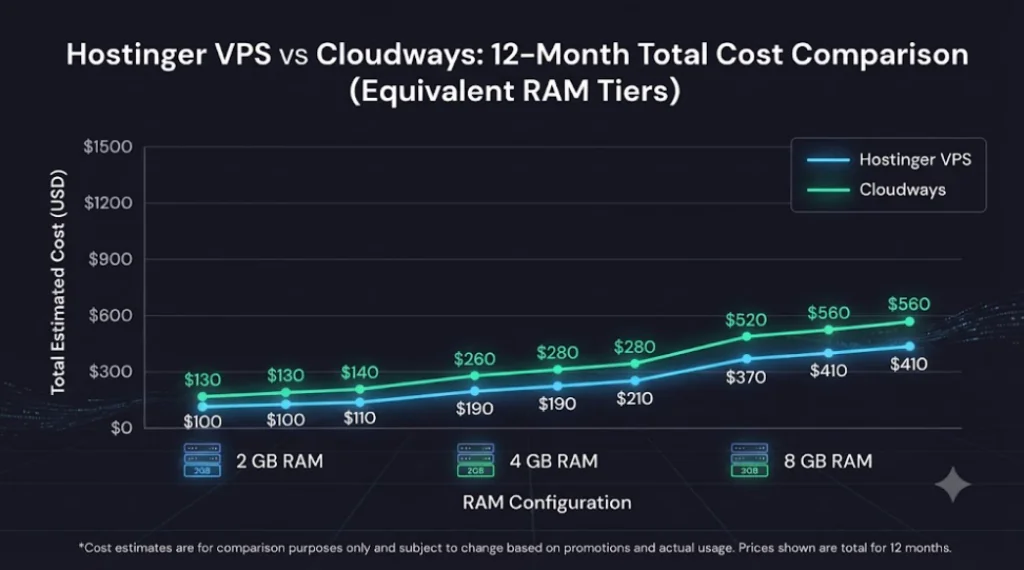
Hostinger VPS vs Cloudways Pricing: Which Is Cheaper for Your Website?
Hostinger VPS Pricing: Big Resources for a Small Monthly Fee
Hostinger’s KVM VPS lineup is known for generous specifications at low entry prices, with plans stepping up from a small 1 vCPU option to larger configurations with many cores and tens of gigabytes of RAM. The headline monthly price assumes a longer commitment, and renewals are billed at a higher regular rate. For raw specs per dollar, Hostinger is difficult to beat.
Cloudways Pricing: Pay-As-You-Go Managed Cloud Hosting
Cloudways plans typically start at around $11 per month on DigitalOcean infrastructure, with higher tiers on Vultr, AWS and Google Cloud costing more. Billing is monthly with no long-term contract, so you can scale up, scale down or leave without a renewal surprise. You also have newer options such as its Autonomous tier for sites with traffic spikes. The trade-off is that you get fewer raw resources than a comparable Hostinger VPS at the same spend.
The Real Cost: What You Pay for Management
The honest way to read the gap is this: the extra money on Cloudways buys you time. If you value your hours at a typical freelance or agency rate, a managed stack that handles updates, caching, backups and server security can easily cost less than the time you would spend maintaining an unmanaged VPS. If you enjoy server work or already have the skills, that premium is harder to justify.
Related articles:
Hostinger Review 2026: Is Hostinger Good Web Hosting for Beginners, Bloggers and Small Business Websites?
Hostinger VPS vs Cloudways Performance: Speed, Uptime and Scalability
Server Speed and Resources: Hostinger KVM VPS vs Cloudways Stack
Hostinger’s VPS plans run on KVM with NVMe storage and modern CPUs, so you can build a fast stack if you configure it well. Cloudways ships a pre-tuned stack with Nginx, Apache, Varnish, Redis and its Breeze caching plugin for WordPress, so a typical site is fast right after setup. In short, Hostinger gives you higher ceiling and more raw resources, while Cloudways gives you a faster, more predictable starting point with less effort.
Uptime, Backups and Scaling Up When Traffic Grows
Cloudways makes vertical scaling simple: you resize your server from the dashboard in a few clicks, and automated backups are built in. On Hostinger VPS you can also upgrade plans, but you will handle more of the migration and configuration yourself. For uptime, both depend on the underlying infrastructure and your configuration, so monitor your own site rather than trusting any single benchmark.

Hostinger VPS vs Cloudways for Ease of Use: Control Panel and Server Management
Hostinger VPS: Root Access, hPanel and Full Control
Hostinger gives you full root access, a web-based management panel and templates for popular applications. That is excellent for developers, power users and anyone hosting several projects, including Node.js apps, Docker containers or custom stacks. The catch is responsibility: security hardening, updates and troubleshooting are largely on you.
Cloudways: Managed WordPress and WooCommerce Hosting Without the Server Work
Cloudways takes care of the server layer. You launch WordPress or WooCommerce apps from the dashboard, use staging and cloning tools, and rely on built-in security and backups. For agencies managing many client sites, that workflow is a major reason Cloudways stays popular.

Hostinger VPS vs Cloudways Support and Security: Who Helps When Things Break?
Support is where managed hosting earns its money. With Cloudways, server-level issues, stack problems and many performance questions fall within the scope of the service, so you have someone to ask. With Hostinger VPS, live chat is available around the clock and the knowledge base is strong, but deep server troubleshooting is generally your responsibility unless you add a managed service. For security, both give you firewall options and SSL, while Cloudways automates much more of the patching.
Who Should Choose Hostinger VPS vs Cloudways? Best Choice by Use Case
Choose Hostinger VPS If You Want Maximum Value and Control
- Technical skills: You are a developer or comfortable with Linux administration.
- Budget: You want the most CPU, RAM and storage per dollar.
- Flexibility: You host multiple projects, apps or custom stacks on one server.
Choose Cloudways If You Want a Managed, Low-Maintenance Setup
- Hands-off hosting: You run WordPress or WooCommerce and do not want to manage servers.
- Agency workflow: You manage client sites and need staging, cloning and backups.
- Flexibility: You prefer monthly billing with no long-term contract.
Hostinger VPS vs Cloudways Final Verdict: Which One Should You Buy in 2026?
There is no universal winner, and anyone who tells you otherwise is skipping the context. Hostinger VPS wins on price, raw power and control. Cloudways wins on convenience, managed performance and peace of mind. My recommendation: if your time is worth more than the price difference, go with Cloudways. If you have the skills and want to stretch your budget, go with Hostinger VPS.
If you are still unsure, both providers let you start small, so test your real site on each and let your own results decide.
Hostinger VPS vs Cloudways FAQs: Questions Buyers Ask Most
Is Hostinger VPS better than Cloudways?
It depends on the job. Hostinger VPS is better for price and control, while Cloudways is better for managed hosting and ease of use.
Is Cloudways worth the extra cost over a VPS?
It is if you value saved time, automated backups and managed server care. If you can administer a server yourself, the premium is harder to justify.
Is Hostinger VPS good for WordPress?
Yes, but you will need to set up and tune the stack yourself, or use a panel or template to speed things up.
Does Cloudways have long-term contracts?
Cloudways typically bills monthly with no long-term contract, which makes it easy to scale or leave.
Which is easier for beginners: Hostinger VPS or Cloudways?
Cloudways is generally easier for beginners who want WordPress hosting without touching the server.