
Table of Contents
Updated 2026 · 12-minute read · Independent comparison
If you’re comparing Podia vs Teachable for beginners, you’re really asking one question: which platform lets you launch and sell your first online course with the least friction, the lowest cost, and the fewest surprises down the road? Both platforms are built for creators without a technical background, but they solve the problem in different ways — Podia bundles a website, email marketing, and course delivery into one subscription, while Teachable focuses almost entirely on building and selling the course experience itself.
This guide breaks down pricing, features, ease of use, and long-term scalability so you can make a decision based on evidence rather than marketing copy. Every figure below reflects each platform’s publicly listed 2026 pricing.

Podia vs Teachable for Beginners: The Quick Verdict
For most brand-new creators, Podia is the more forgiving starting point because it combines a website, email marketing, and course hosting in a single low-cost plan — you don’t need to buy or connect separate tools just to have a functioning online business. Teachable is the stronger choice if your only goal is a highly polished, course-first storefront and you’re prepared to pair it with a separate email or marketing tool later.
Neither platform is objectively “better” in a vacuum — the right answer depends on your budget, how many products you plan to sell, and whether you want one platform to run your entire business or a specialist tool just for course delivery. The sections below unpack exactly why.
What Is Podia?
Podia is an all-in-one platform for selling online courses, digital downloads, coaching sessions, memberships, and webinars. It was built specifically for solo creators and small teams who don’t want to stitch together a website builder, an email service, and a course host separately.
Key Features for Beginners
- Simple course builder — set up and publish courses without touching code, using a drag-and-drop builder.
- Built-in website — every plan includes a customizable storefront and blog, so you don’t need WordPress or Squarespace on the side.
- Native email marketing — broadcast emails and basic automations are included even on the entry-level plan, which most competitors charge extra for.
- Multiple product types — sell one-off products, memberships, coaching calls, and bundles from the same dashboard as your course.
- Unlimited hosting — Podia handles video hosting and delivery, so there’s no need for a separate service like Vimeo.
Podia Pricing in 2026
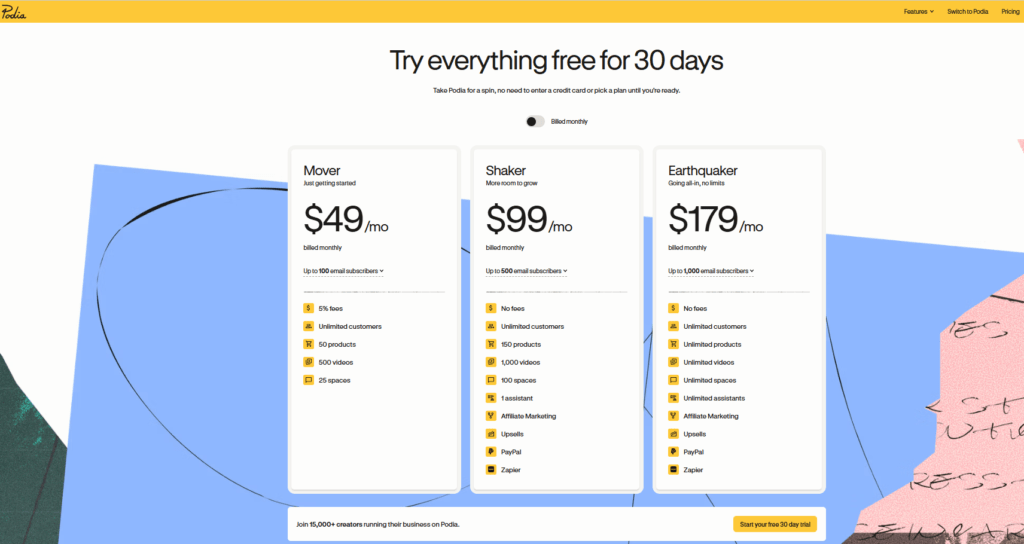
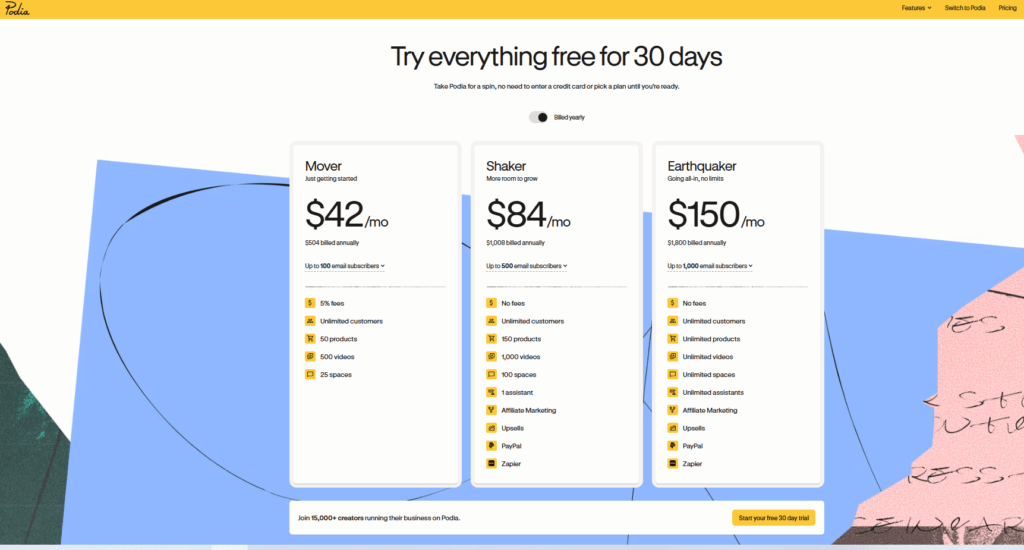
Podia offers three paid plans, billed monthly or annually (annual billing saves roughly 14–16%). There is no permanent free plan, but every new account gets a 30-day free trial with no credit card required.
- Mover — $49/month billed monthly, or $42/month billed annually. Includes unlimited products and customers, an online store, blogging, and email marketing, but carries a 5% transaction fee on every sale.
- Shaker — $99/month billed monthly, or $84/month billed annually. Removes the transaction fee entirely and adds affiliate marketing.
- Earthquaker — $179/month billed monthly, or $150/month billed annually. Adds priority support and higher subscriber limits for scaling businesses.
Note: Stripe or PayPal’s own processing fee (typically 2.9% + $0.30 per transaction) applies on every Podia plan regardless of tier — this is a payment-processor cost, not a Podia fee.
What Is Teachable?
Teachable is a course-hosting platform built to help instructors package and sell structured courses with a professional, classroom-like interface. It’s less focused on being a full business hub and more focused on making the course itself look and feel polished.
Key Features for Beginners
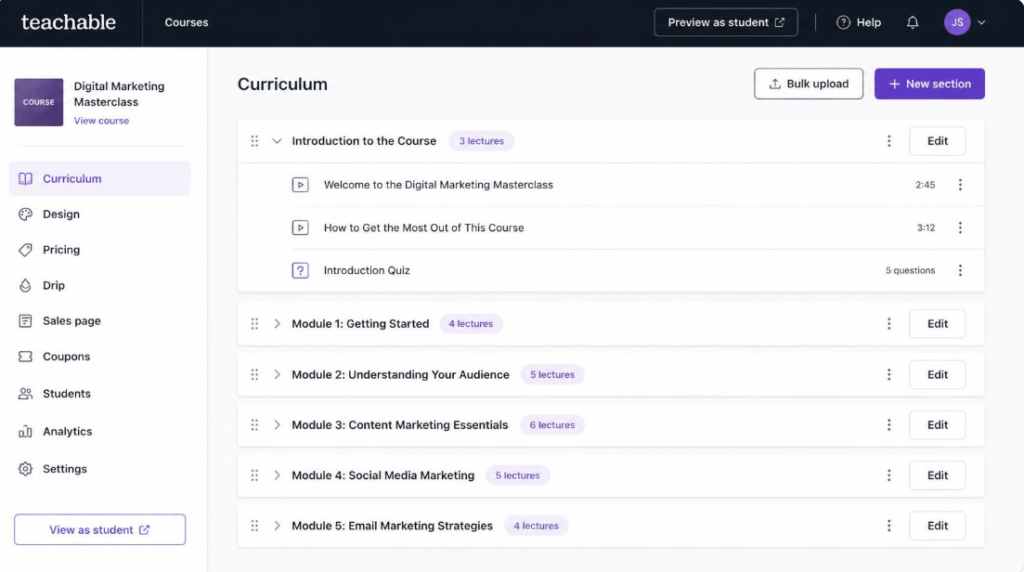
- Strong course-delivery experience — quizzes, compliance certificates, drip content, and a clean student dashboard out of the box.
- Affiliate marketplace — built-in tools to sell courses through affiliates and coupon codes.
- Flexible pricing options — supports one-time payments, subscriptions, payment plans, and free trials for courses.
- Instructor-friendly course builder — the interface for building lessons and modules is widely considered one of the most intuitive in the category.
Teachable Pricing in 2026
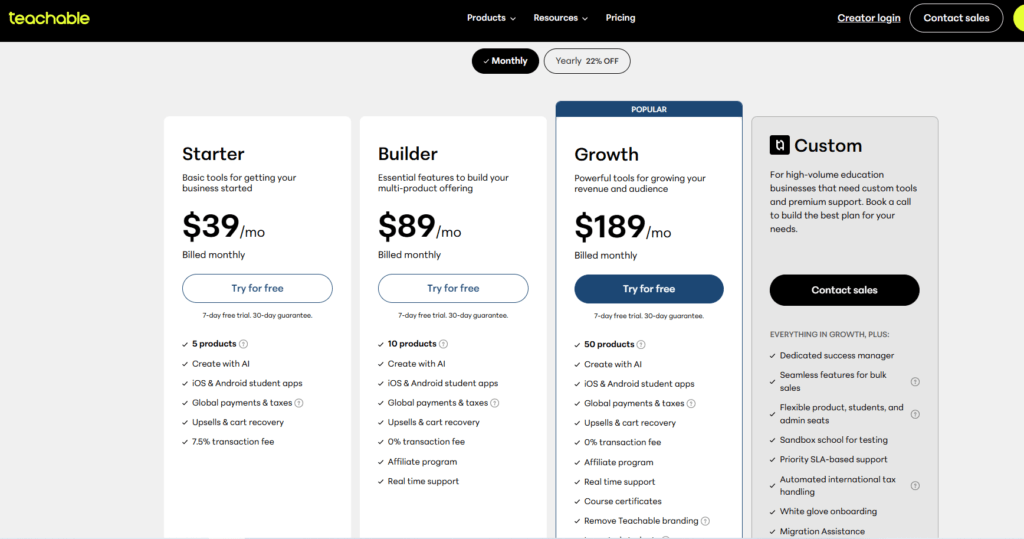
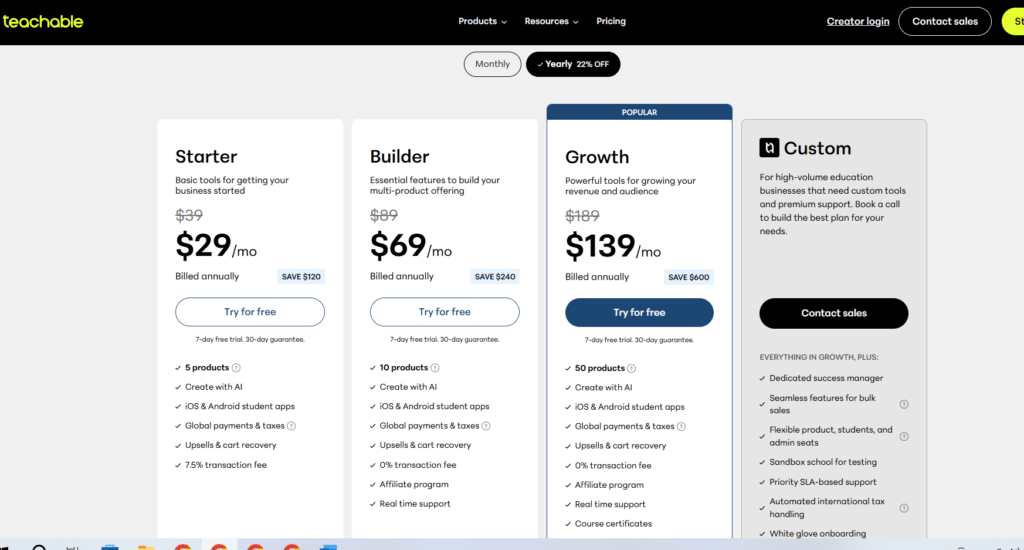
Teachable runs four paid tiers, billed monthly or annually (annual billing saves roughly 25–30%). A 7-day free trial is available on paid plans; there is no longer a permanent free tier.
- Starter — $39/month billed monthly, or $29/month billed annually. Limited to one published product and 100 students, with a steep 7.5% transaction fee on every sale.
- Builder — $89/month billed monthly, or $69/month billed annually. Removes transaction fees and unlocks up to 5 products and 1,000 students — the plan most reviewers recommend as the real starting point.
- Growth — $189/month billed monthly, or $139/month billed annually. Supports up to 25 products, unlimited students, and advanced marketing tools.
- Advanced — $399/month billed monthly, or $309/month billed annually. Built for large teams and enterprise-scale course businesses.
Note: As with Podia, standard card-processing fees from Stripe or PayPal apply on top of Teachable’s own transaction fees.
Podia vs Teachable: Head-to-Head Comparison
The table below lines up the two platforms on the factors that matter most to someone launching their first course.
| Criteria | Podia | Teachable |
| Entry-level price (annual) | $42/month (Mover) | $29/month (Starter) |
| Transaction fee on entry plan | 5% per sale | 7.5% per sale |
| Zero-fee plan starts at | $84/month (Shaker) | $69/month (Builder) |
| Free trial | 30 days, no card required | 7 days on paid plans |
| Course product limit (entry plan) | Unlimited | 1 product (Starter) |
| Website & blog builder | Yes, built in | Limited; course-page focused |
| Email marketing built in | Yes, all plans | No native tool; needs integration |
| Coaching / webinars | Yes (higher plans) | Not a core feature |
| Best fit | Solo creators selling courses, coaching, memberships and digital downloads under one roof | Creators who want a dedicated, polished course-delivery interface first |
Ease of Use
Both platforms are designed for non-technical users, and neither requires coding knowledge. Podia’s dashboard leans slightly simpler because it consolidates fewer separate sections — your store, blog, email, and courses live under one clear navigation. Teachable’s interface is equally clean but is organized specifically around course structure, which can feel more intuitive if your only product is a multi-module course.
Pricing & Transaction Fees
On paper, Teachable’s entry price ($29/month annual) undercuts Podia’s ($42/month annual). But the entry-level Teachable plan restricts you to a single product and charges a 7.5% transaction fee — nearly a third of a $30 course sale goes to fees before payment processing is even counted. Podia’s entry plan allows unlimited products at a lower 5% fee. Once you compare the tiers that remove transaction fees entirely (Podia Shaker at $84/month vs. Teachable Builder at $69/month), Teachable becomes the cheaper zero-fee option — but Podia includes email marketing and a website at that price point, which Teachable does not.
Course Creation Tools
Teachable has a slight edge for pure course delivery: quizzes, completion certificates, and drip scheduling feel more mature. Podia’s course builder covers the essentials — modules, lessons, downloadable files, and progress tracking — but is less specialized for compliance-style or certification courses.
Marketing & Sales Features
This is where Podia pulls ahead for beginners specifically. Because email broadcasts and basic automation are included on every plan, a new creator can build an audience and launch a course without paying for a third tool like Mailchimp or ConvertKit. Teachable’s marketing capability is centered on its affiliate program and coupon system, but it does not include native email marketing, meaning most Teachable users end up paying for a separate email platform.
Customer Support
Both platforms offer live chat and email support on paid plans, with faster response times reserved for higher tiers. Neither platform publishes guaranteed response-time SLAs on entry-level plans, so beginners on either platform should expect standard (not white-glove) support until they upgrade.
Which Platform Should Beginners Choose?
Choose Podia If…
- You want to sell more than just courses — coaching, downloads, or memberships — from one dashboard.
- You don’t already have a website or an email marketing tool and want both included.
- You’d rather pay a slightly higher entry price than lose 7.5% per sale on a limited plan.
- You value a longer, no-card-required trial to test the platform properly.
Choose Teachable If…
- Your primary or only product is a structured, multi-module course.
- You want the most course-focused, classroom-style student experience available.
- You already have (or plan to add) a separate email marketing tool.
- You expect to scale past 1,000 students and want a platform built for that volume.
Frequently Asked Questions
Is Podia or Teachable better for a complete beginner with no tech skills?
Both are beginner-friendly, but Podia requires fewer external tools to get a course business running end-to-end, which reduces the learning curve for someone starting from zero.
Which platform is cheaper for a first course?
Teachable’s Starter plan is cheaper on the surface ($29/month), but its 7.5% transaction fee and one-product limit make Podia’s Mover plan ($42/month, 5% fee, unlimited products) more cost-effective for anyone planning more than one product.
Can I switch from Teachable to Podia (or vice versa) later?
Yes. Both platforms allow course content, videos, and student data to be exported or migrated, though the process typically requires manual re-uploading rather than a one-click transfer.
Do either Podia or Teachable take a cut of my revenue?
Only on their entry-level plans. Podia charges 5% on Mover; Teachable charges 7.5% on Starter. Both eliminate transaction fees entirely once you upgrade to their respective mid-tier plans.
Final Verdict
Weighing Podia vs Teachable for beginners ultimately comes down to scope. If your ambition is a single, well-produced course, Teachable’s course-first design and lower headline price are compelling. If you’re building a broader creator business — one that will eventually include email lists, coaching, or multiple product types — Podia’s all-in-one structure will save you both money and setup time within the first few months.
Both platforms offer a risk-free way to test this in practice before paying anything.
RECENT POST:
Podia Review 2026: Is It Still the Best All-in-One Platform for Creators?