

Table of Contents
If you have ever spent an entire afternoon researching a single keyword, cross-referencing ten competing articles, and still ended up with a content brief that felt incomplete, you already understand the problem that Frase.io was built to solve. Frase.io is an AI-powered content optimization platform that compresses the research, outlining, writing, and on-page optimization stages of SEO content production into a single workflow. Instead of manually reading through the top-ranking pages for a keyword, Frase.io scrapes and analyzes them in seconds, then hands you a data-backed brief, a topic score, and AI writing assistance to fill in the gaps.
This tutorial is written for content marketers, SEO specialists, and freelance writers who want a practical, step-by-step walkthrough of Frase.io rather than a marketing overview. We will cover account setup, keyword research, content brief creation, the AI writing features, and post-publish optimization, so that by the end you can decide with confidence whether Frase.io deserves a place in your content stack.
What Is Frase.io? An Overview of the AI-Powered SEO Content Tool
The technical advantage worth understanding before you start is architectural: Frase.io merges SERP-based competitive research and generative AI writing into a single workspace, so you move from a raw target keyword to a structured, data-backed draft without switching between a separate research tool and a separate editor. That single-workspace design is what the rest of this tutorial walks through step by step. (For a full feature-by-feature breakdown, see our dedicated Frase.io review.)
How to Use Frase.io: Setting Up Your Account and First Project
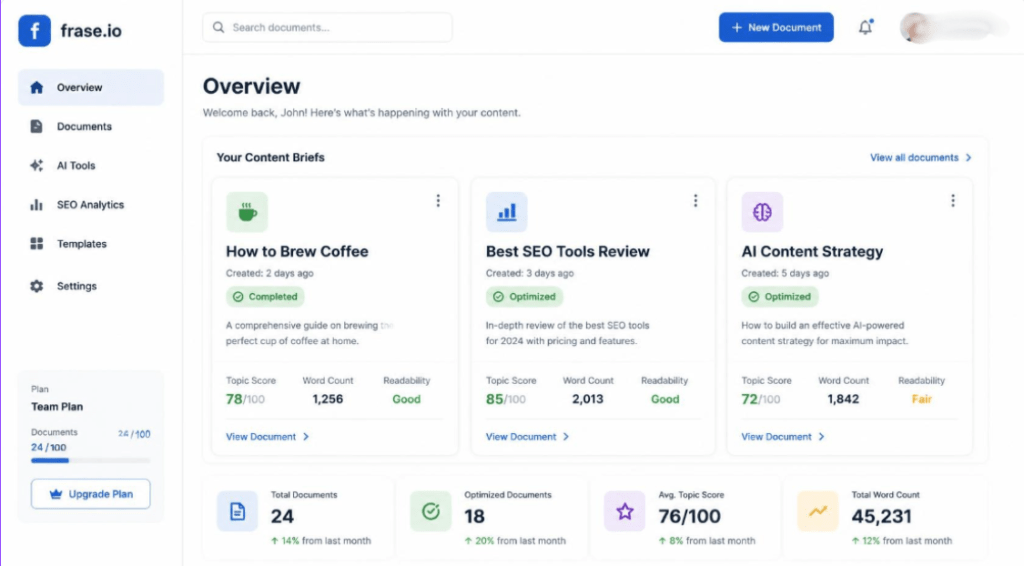
Getting started with Frase.io takes only a few minutes. This section is a practical hướng dẫn sử dụng Frase.io — a hands-on walkthrough — covering account creation through your first workspace.
Step 1: Sign Up and Choose a Plan
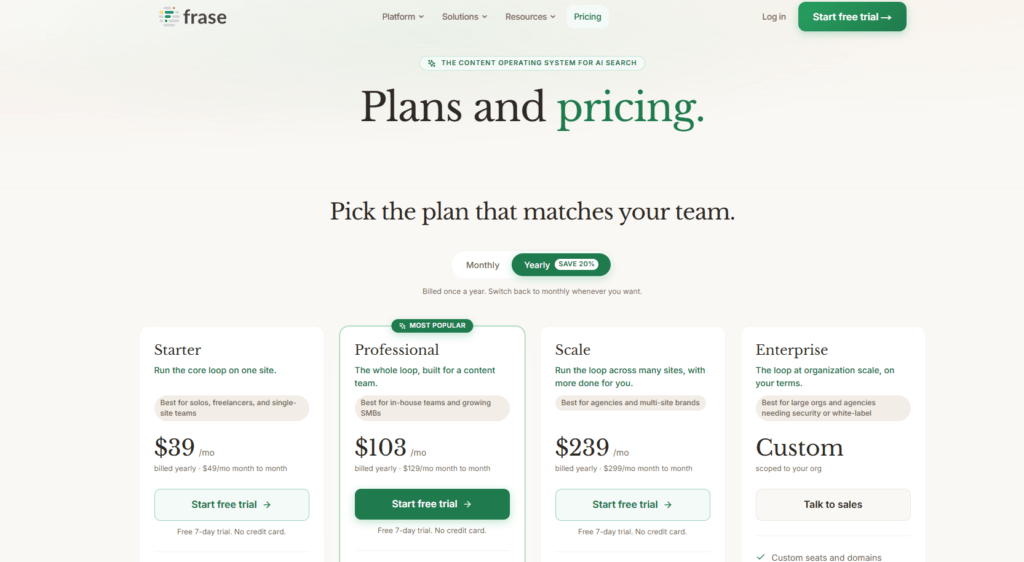
Navigate to the Frase.io website and start the 7-day free trial — no credit card is required to sign up. That window is enough to test the content brief and AI writer features on a handful of articles before deciding on a monthly or annual plan. During sign-up, you will be asked to connect a Google Search Console property; this step is optional but unlocks the Content Analytics module discussed later in this tutorial.
Step 2: Creating Your First Workspace and Document
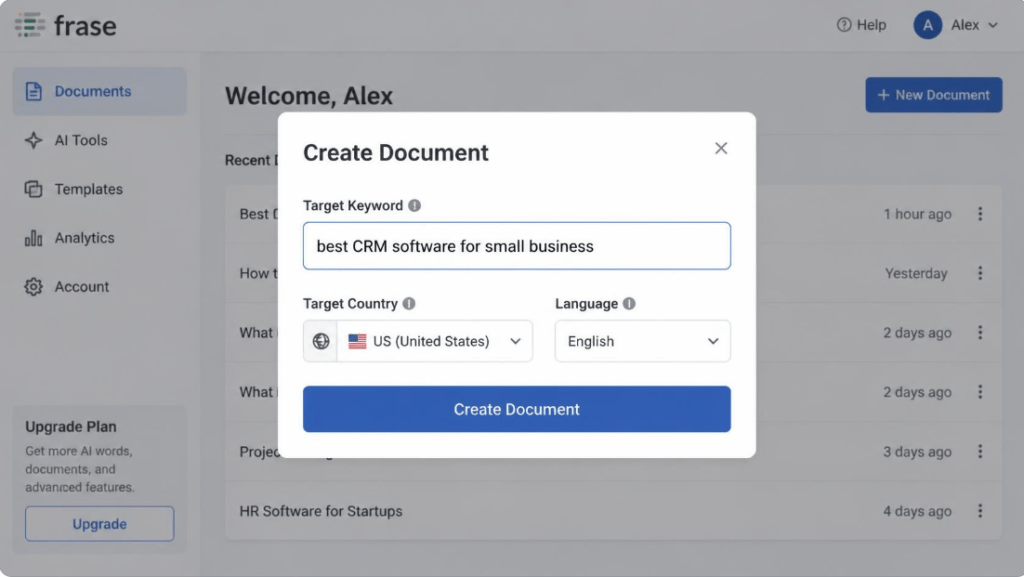
Once logged in, click the button to start a new document. Frase.io will prompt you to enter a target keyword and select a target country and language for the SERP analysis. This is the single most important input in the entire workflow: the keyword you choose determines every competitor page Frase.io will analyze, so pick the exact query your audience searches for rather than a broad topic label.
- Enter your target keyword in the search field.
- Select the correct search engine location (this affects which SERP results are pulled).
- Click “Create Document” to generate an initial content brief.
Frase.io’s Keyword Research Tool: Finding the Right Topics to Target
Before writing a single word, most SEO writers need to validate that a keyword is worth targeting. Frase.io’s keyword research tool is not a full replacement for a dedicated keyword database, but it does a competent job of surfacing related queries and questions directly from live search results, which keeps your research grounded in current SERP behavior rather than static keyword volume data alone.
Analyzing Search Intent from the SERP
Inside a content brief, Frase.io displays the list of pages currently ranking for your target keyword, along with their word count, domain authority estimate, and the headings each page uses. Scanning this list for five minutes will usually tell you more about search intent than any keyword tool metric: if every ranking page is a comparison table, Google is signaling commercial intent; if they are all long-form guides, informational intent is expected.
Building Topic Clusters with the Question Explorer
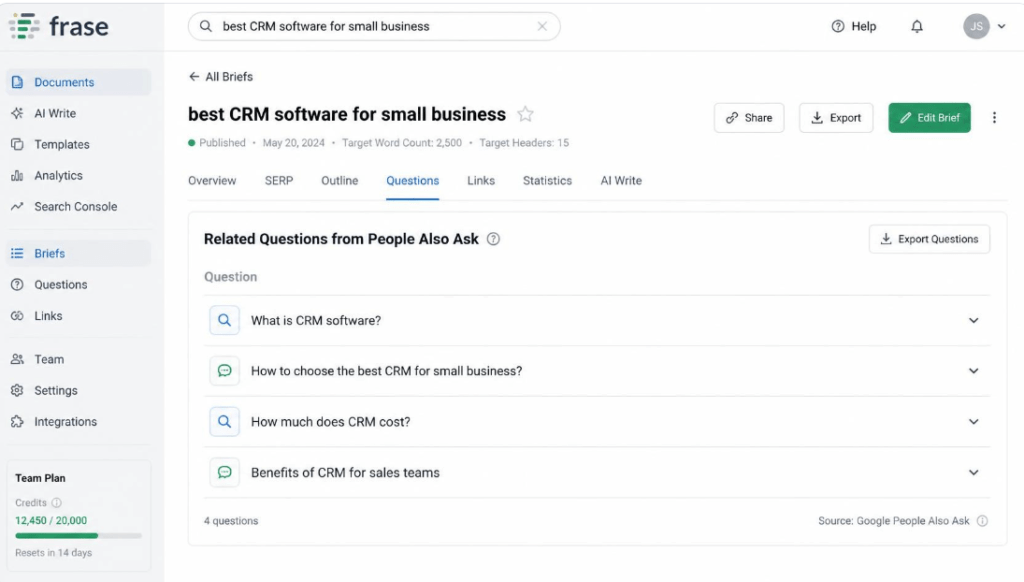
Frase.io also includes a “Questions” tab that pulls People Also Ask data and related questions from forums and Q&A sites. This is particularly useful for building topic clusters: you can identify a pillar keyword, then use the question list to generate a set of supporting subtopics or FAQ entries that reinforce topical relevance for the pillar page.
Writing SEO-Optimized Content with Frase.io: The Content Brief Workflow
This is the section most readers come to Frase.io for: the actual process of turning a raw SERP analysis into a finished, optimized draft. Writing SEO-optimized content with Frase.io generally follows four sub-steps — generating the brief, reviewing the topic score, building an outline, and drafting the content.
Generating a Content Brief
After you create a document, Frase.io compiles a brief automatically. This includes a suggested word count range (based on the average length of top-ranking pages), a list of headings extracted from competitor articles, and a table of statistics and quotes pulled from those same sources. You can toggle individual headings on or off to build a custom outline rather than accepting the default structure wholesale.
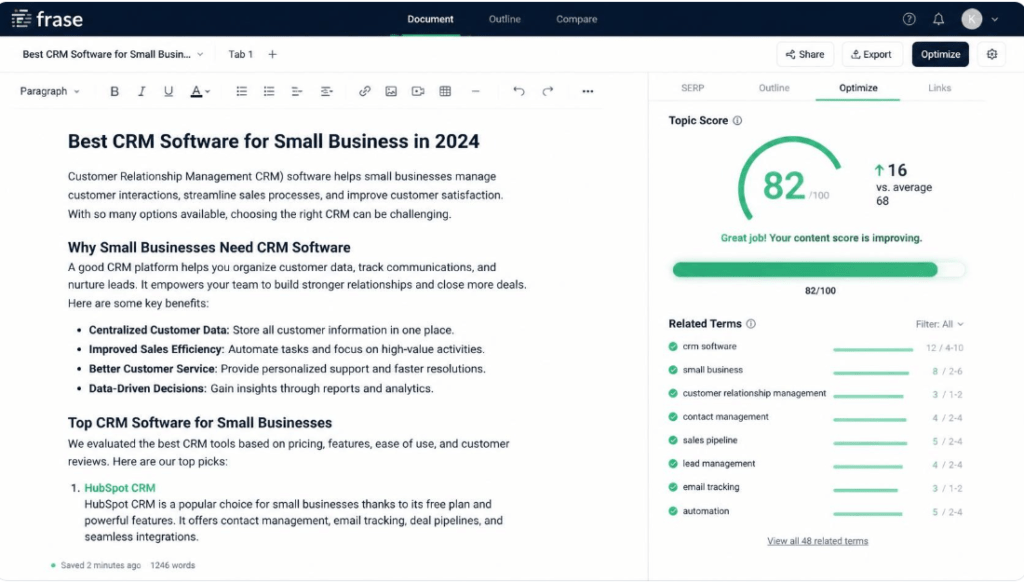
Understanding the Topic Score
As you write inside the editor, Frase.io calculates a Topic Score that compares the terms and entities in your draft against those used by top-ranking competitors. The score is not a ranking guarantee, but it functions as a useful proxy for topical completeness — a low score often means you are missing subtopics that searchers, and by extension Google, expect an article on this keyword to cover.
It’s also worth noting that a strong Topic Score pays off beyond the Google SERP. Because generative AI engines such as ChatGPT, Perplexity, and Gemini tend to favor content with comprehensive entity coverage and clearly answered subtopics when choosing sources to cite, the same topical depth that raises your Topic Score also raises your odds of being cited in AI-generated answers — a discipline increasingly referred to as Generative Engine Optimization (GEO).
Using the Outline Builder to Structure Your Draft
The outline builder lets you drag and drop suggested headings, add your own, and nest H3 subheadings under an H2 section. A well-structured outline built this way tends to reduce revision cycles significantly, because the heading hierarchy is already informed by what is actually ranking, rather than a structure you have to guess and then correct after an editor review.
- Drag competitor headings directly into your outline to reuse proven structures.
- Reorder sections to match a logical narrative flow rather than the order competitors happen to use.
- Add custom headings for unique angles competitors have missed — this is often where differentiation happens.
Exploring Frase.io’s AI Features for Content Creation
Once the outline is in place, the AI features of Frase.io come into play for drafting. These tools are best treated as an acceleration layer for a human writer rather than a fully autonomous content generator — the highest-performing content on Frase.io-assisted workflows is typically AI-drafted and then substantially edited by a subject-matter expert.
AI Writer and the Answer Engine
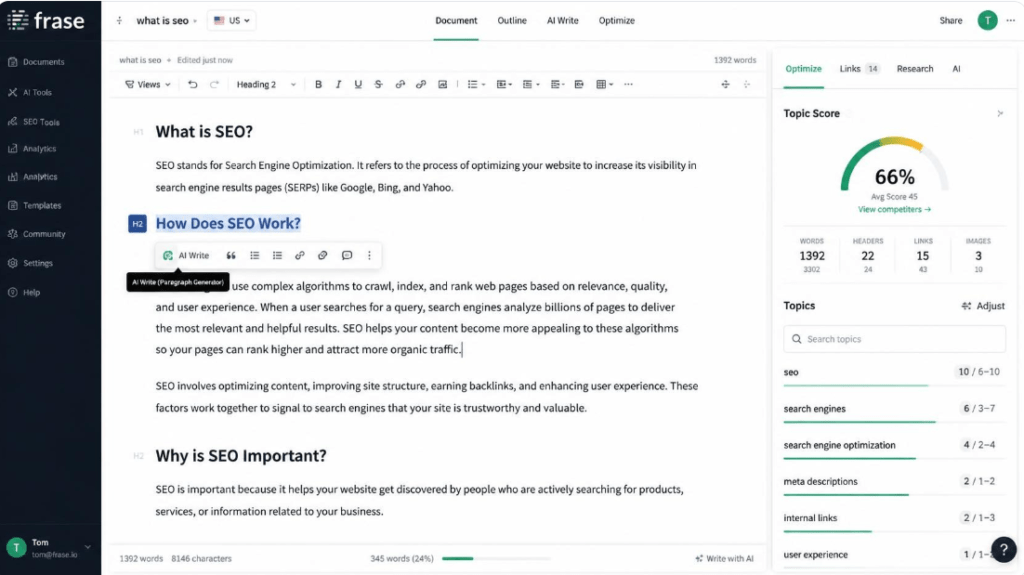
Highlighting a heading and clicking the AI writing option prompts Frase.io to generate a paragraph or two based on the brief’s context and any source material you have provided. The “Answer Engine” feature works similarly for FAQ-style content: type a question, and Frase.io drafts a concise answer synthesized from the top-ranking pages’ content on that exact question.
Content Scoring and Real-Time Optimization Suggestions
As you draft, a sidebar panel lists specific terms and phrases you have not yet used that appear frequently in competitor content. This is a lightweight but effective way to catch topical gaps before publishing, rather than discovering them after the article has been live for months without ranking movement.
Optimizing SEO Content with Frase.io: Post-Publish Analytics
Writing the article is only half the job. Optimizing content with Frase.io continues after publication through its Content Analytics module, which connects to Google Search Console to track how each page performs over time.
Using the Content Analytics Dashboard
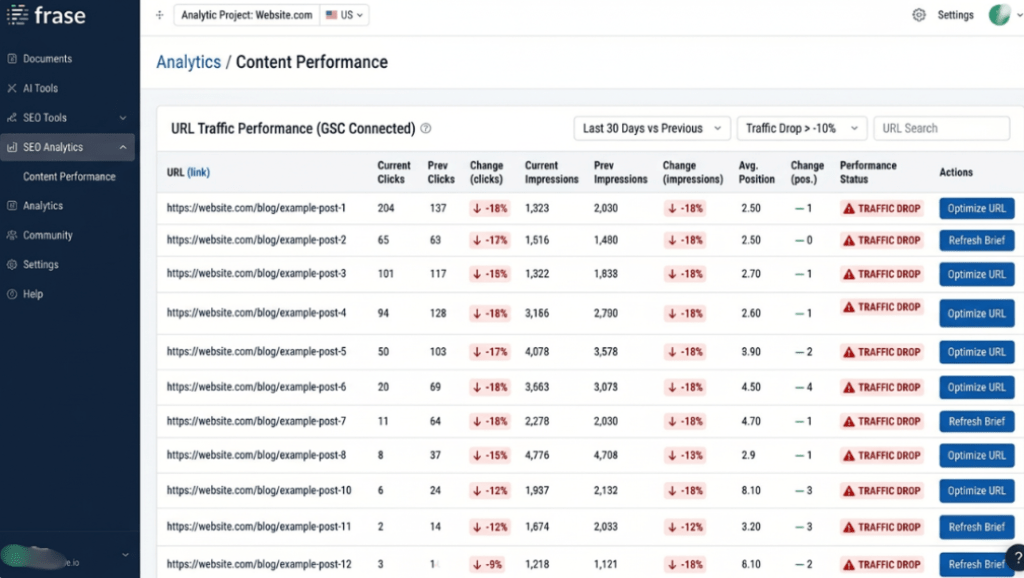
The dashboard groups your published URLs by traffic trend, flagging pages that have lost impressions or clicks over a recent period. For teams managing large content libraries, this triage view is often more valuable day-to-day than the brief-generation tool, since it directs limited editing resources toward the pages most likely to see a ranking improvement from a refresh.
Refreshing Underperforming Pages
When a page is flagged, Frase.io lets you re-run the original content brief against the current SERP. Search results shift over time, and a brief generated a year ago may no longer reflect what is currently ranking. Re-running the analysis and updating the Topic Score against fresh competitor data is one of the more underrated features in the platform, and it is a workflow many users overlook until traffic has already declined significantly.
Frase.io Pricing and Plans: Is It Worth the Investment?
Frase.io’s pricing has historically been structured around tiered plans that differ mainly in the number of documents (briefs) you can generate per month and the number of team seats included. Solo bloggers and freelance writers typically fit comfortably into the entry-level tier, while agencies producing content at scale usually need a higher tier with unlimited or high-volume document allowances and team collaboration features. Because SaaS pricing changes periodically, it is worth checking the current pricing page directly before purchasing rather than relying on figures from an older review.
A practical way to evaluate the investment: divide the monthly subscription cost by the number of articles your team publishes. If Frase.io saves even thirty minutes of research per article, most teams recover the subscription cost well within the first month.
Frase.io Pros and Cons: An Honest Assessment
What Frase.io Does Well
- Genuinely fast SERP research compared to manual competitor analysis.
- A clean, distraction-light editor that keeps research and writing in one screen.
- Content Analytics gives a clear, prioritized list of pages worth updating.
- Lower cost than several enterprise-grade SEO content platforms.
Where Frase.io Falls Short
- The AI writer, like most generative tools, requires fact-checking and a human editing pass — it should not be published verbatim.
- Keyword volume and difficulty data are less robust than dedicated keyword research tools.
- Topic Score correlates with topical coverage, not with ranking position, so a high score is not a guarantee of first-page placement.
Conclusion: Should You Use Frase.io for Your SEO Content Strategy?
Frase.io will not replace strong writing, original research, or genuine subject-matter expertise, and it was never designed to. What it does replace is the slow, manual process of reverse-engineering what a page needs to cover in order to compete for a given keyword. For content teams that publish regularly and want a faster, more consistent path from keyword to a well-structured, competitively researched draft, Frase.io is one of the more mature tools currently available in this category.
If your current content process still involves manually opening ten browser tabs to compare competitor headings, it is worth trialing Frase.io on a single article and comparing the time spent against your usual workflow. The difference tends to be immediately obvious — and as search shifts toward AI-generated answers, a workflow that already optimizes for topical depth puts you ahead on both fronts: classic SERP rankings and GEO citation readiness.
RELATED ARTICLES:
Frase.io vs Surfer SEO: An Expert Comparison for Smarter Content Strategy
Frase.io Review 2026: An Expert’s Honest Verdict on the AI Content Platform