
Table of Contents
If you have landed on this Castmagic review while comparing AI tools to speed up your podcast or video workflow, you already know the pain point: one hour of recorded audio should not cost you three or four hours of manual post-production. As a content strategist who has tested dozens of AI repurposing platforms over the past two years, I put Castmagic through the same real-world workload I use to judge every tool in this category — transcription accuracy, output quality, pricing transparency, and how well it fits into an actual publishing routine. This Castmagic review breaks down exactly what the platform does well, where it falls short, and who should (and should not) subscribe in 2026.
Castmagic Review: What Is Castmagic and How Does It Actually Work?
Castmagic is a cloud-based, AI-powered content repurposing platform built for podcasters, marketers, coaches, YouTubers, and B2B teams who record audio or video and need to turn it into written and social content without hiring a full production team. Launched in 2023, the platform has grown into one of the most recognized names in the “one upload, many assets” category, alongside tools like Descript and Otter.ai. Rather than editing your audio or video, Castmagic focuses entirely on what happens after the recording is finished: transcription, analysis, and content generation.
How Castmagic Turns a Single Recording Into a Full Content Set
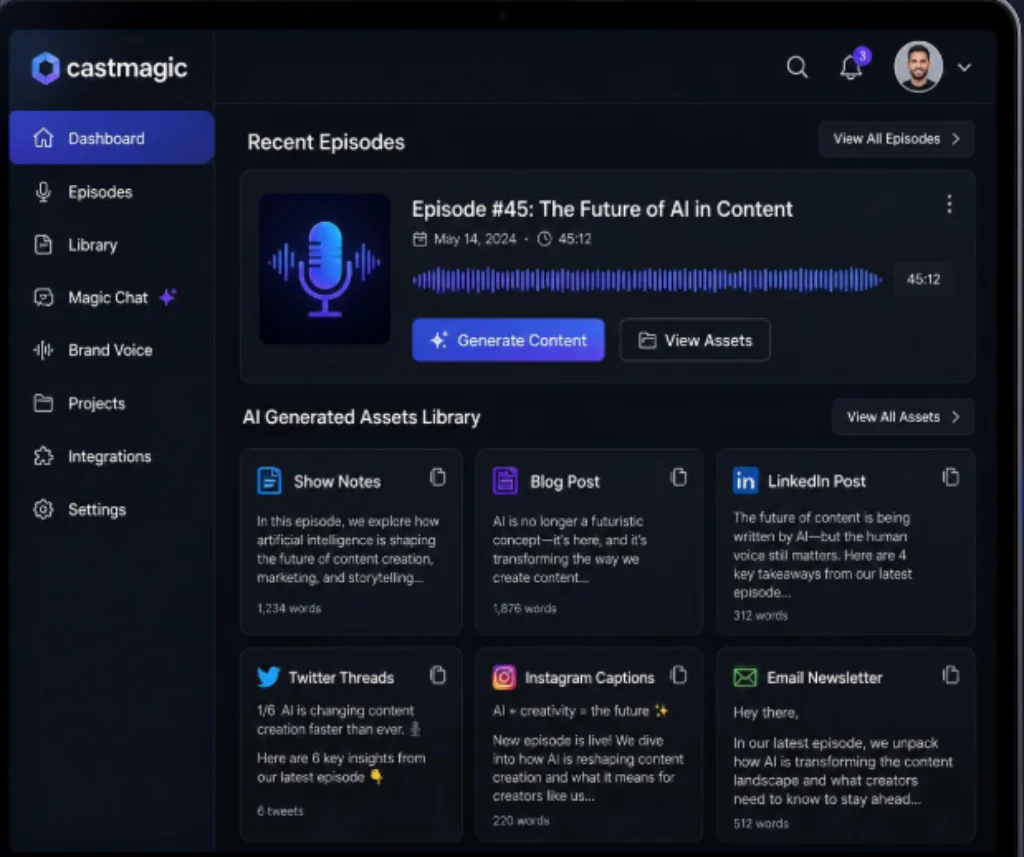
The workflow is refreshingly simple, which is a big part of the platform’s appeal. You upload a file, connect a Zoom or Google Drive recording, or point Castmagic at your podcast RSS feed for automatic ingestion. From there, the platform runs three steps: it transcribes the audio with automatic speaker detection, analyzes the transcript for structure, topics, and quotable moments, and then generates a library of ready-to-edit assets, including show notes, blog drafts, email newsletters, and social captions. In my testing, a 45-minute interview episode produced a full content set — transcript, summary, timestamps, five social posts, and a newsletter draft — in well under 20 minutes.
Who Castmagic Is Built For: Podcasters, Marketers, and Content Teams
Castmagic is aimed squarely at people who already have a steady stream of recorded audio or video and need to extract more value from it: solo podcasters trying to keep up with weekly publishing, marketing teams repurposing webinars and sales calls, YouTubers who dread writing companion blog posts, and agencies producing content for multiple clients. It is less useful if your main need is actually editing the audio or video itself — Castmagic does not trim, cut, or clean up recordings the way Descript does.
Key Castmagic Features Every Content Creator Should Know
AI Transcription Accuracy and Automatic Speaker Detection
Transcription is the foundation of everything Castmagic does, and it holds up well. For clear, well-recorded English audio, accuracy consistently lands above 95%, and the platform supports more than 60 languages for multilingual creators. Automatic speaker detection labels each voice in the transcript, which saves significant editing time on multi-guest interviews, and a filler-word removal option cleans up “um,” “uh,” and dead air before you export.
Show Notes, Blog Posts, and Long-Form Content Generation
Where Castmagic differentiates itself is in long-form output. Its “Pages” feature can combine multiple recordings into a single long-form asset, which is genuinely useful for creators who want to compile a multi-episode series into one comprehensive guide or report. Show notes come with linked resources automatically pulled from what was mentioned in the episode, and blog drafts follow a coherent structure rather than reading like a raw transcript dump. Expect an 80% first draft: usable and well-organized, but still worth a human editing pass before publishing.
Social Media Repurposing Tools for Podcasts and YouTube Videos
Beyond long-form content, Castmagic generates platform-specific assets: LinkedIn carousels, Twitter/X threads, Instagram Reel scripts, pull quotes for graphics, and suggested episode titles. Teams can customize the prompt templates behind each output, tag collaborators, and leave comments directly inside the workspace, which makes it workable for small content teams rather than just solo users.
Castmagic Pricing Plans in 2026: Hobby, Starter, Business, and Scale
Castmagic prices around a single variable: how many hours of transcription you need per month. Based on the plans listed on the official pricing page as of mid-2026 (billed annually), the structure looks like this:
- Hobby — around $21/month (billed yearly): 5 hours of transcription, 5 seats, 10 long-form outputs per month. Best for casual or early-stage solo creators.
- Starter — around $79/month (billed yearly): 20 hours of transcription, 10 seats, unlimited long-form outputs, plus an onboarding call. The most common choice for creators publishing weekly.
- Business — around $790/month (billed yearly): 80 hours of transcription, 20 seats, and workspace customization for studios and agencies.
- Scale — custom pricing for large platforms with high-volume, high-seat requirements and dedicated support.
Note the gap between Starter and Business: it is roughly a 10x jump in price for a 4x increase in transcription hours, which is worth flagging for growing agencies. Monthly billing (without the annual discount) runs about 20% higher across every tier, and unlimited re-generations and file uploads are included on all plans. Pricing changes periodically, so always confirm current numbers on Castmagic’s official site before subscribing.
Which Castmagic Pricing Plan Matches Your Monthly Content Volume
If you publish one podcast episode every week or two and work solo, Hobby is enough to test the waters. If you or your team publish weekly and need unlimited long-form outputs, Starter is the realistic entry point for serious use. Business only makes sense once you are consistently processing multiple hours of content weekly across several team members or clients — otherwise, the cost per hour becomes hard to justify against hiring a freelance editor.
Castmagic Pros and Cons for Podcasters and Marketing Teams
Where Castmagic Excels
- Genuinely fast turnaround: a full content set from a 45-minute recording in under 20 minutes.
- Strong transcription accuracy with automatic speaker detection and filler-word cleanup.
- Wide range of outputs — show notes, blog posts, newsletters, social posts — from a single upload.
- Support for 60+ languages, useful for international or multilingual creators.
- Responsive live chat support and a helpful onboarding process for new users.
- RSS feed automation, so recurring podcasts can process new episodes without manual uploads.
Where Castmagic Still Falls Short
- No audio or video editing — you will still need a separate tool like Descript for that.
- No permanent free plan, only a limited free trial covering one episode.
- No native mobile app, which limits on-the-go review of generated content.
- The interface, while functional, feels less polished than newer competitors.
- Pricing jumps steeply between the Starter and Business tiers, which can strain scaling agencies.
- Output quality is a strong first draft, not publish-ready copy — human editing is still required.
Castmagic vs Descript vs Otter.ai: Choosing the Right AI Podcast Tool
Castmagic, Descript, and Otter.ai often get compared because they all touch transcription, but they solve different problems. Otter.ai is primarily a meeting and note-taking transcription tool with lighter content generation. Descript is a text-based audio and video editor first, with AI content features layered on top — choose it if you need to actually cut and polish recordings. Castmagic does not edit media at all; it exists purely to turn a finished recording into a broad set of written and social content as efficiently as possible. Many established podcasters end up running a small stack — Descript (or another editor) for production, plus Castmagic for repurposing — rather than expecting a single tool to do both jobs well.
Is Castmagic Worth It in 2026? Our Final Verdict
Castmagic earns its place as one of the strongest AI content repurposing tools on the market in 2026, specifically for creators and teams who already have a steady recording habit and want their post-production time back. The transcription is reliable, the output variety is broad, and the time savings are real and measurable. It is not the right fit if you need audio editing, a permanent free plan, or a mobile-first workflow. For everyone else — podcasters, YouTubers, coaches, and marketing teams turning long-form audio into a content engine — the return on a modest monthly subscription is easy to justify after the first episode alone.
The smartest way to evaluate any AI content tool is to test it against your own recordings rather than someone else’s screenshots. Castmagic’s free trial lets you upload one real episode and see the exact outputs your workflow would produce.
START YOUR FREE CASTMAGIC TRIAL NOW
Frequently Asked Questions About Castmagic
Is Castmagic good for solo podcasters just starting out?
Yes. The Hobby plan is priced for casual, low-volume creators, and the free trial lets a new podcaster test transcription quality and output style on one real episode before committing to a subscription.
Does Castmagic offer a free trial before you pay?
Castmagic offers a free trial that allows you to upload one episode and test the core features, including transcription, show notes, and social content generation, before choosing a paid plan.
Is Castmagic worth the price compared to hiring a freelance editor?
For creators publishing weekly, the Starter plan typically costs far less per month than a freelance show-notes or content writer, even though the output still benefits from a light editing pass before publishing.
Can Castmagic replace an audio or video editing tool?
No. Castmagic does not cut, trim, or clean up audio or video. It is built purely for turning a finished recording into written and social content, so most serious creators pair it with a dedicated editor like Descript.
Whether you produce a weekly interview show, a solo commentary podcast, or a library of recorded webinars, this Castmagic review should give you a clear, realistic picture of what to expect. Try it on your own content before deciding — the free trial is the fastest way to know if it fits your workflow.
RECENT POST:
Best Online Course Platforms in 2026: Why Podia Is the Sweet-Spot Winner for Solopreneurs