

Content marketing is still the king of organic traffic, but using Writesonic to write a comprehensive, high-quality, 2,000-word blog post from scratch can easily save you from sucking up 4 to 6 hours of your day. If you are managing a growing digital agency or spinning up a new affiliate site, this powerful AI tool gives you the luxury of time you simply do not have.
What if you could slash that time down to less than 5 minutes without sacrificing factual accuracy or SEO optimization?
Thanks to modern AI advancements, you can. In this step-by-step guide, we will show you exactly how to use Writesonic—our favorite AI-powered content workstation—to research, outline, and write a rank-ready, long-form article in minutes.
What’s Inside This Guide
Why Writesonic is Built Different for SEO Content
Most people default to general chatbots like ChatGPT for writing. However, generic LLMs lack real-time search data and structural awareness of SEO. Writesonic solves this by splitting its ecosystem into dedicated SEO & Content Workflows.
Instead of endless prompting, its specialized AI Agents fetch real-time Google data, analyze your competitors’ structures, and naturally weave in profitable keywords.
Here is how to do it in 4 simple steps.
How to Generate Long-Form Content with Writesonic
Step 1: Access the Writesonic Content Creation Agent
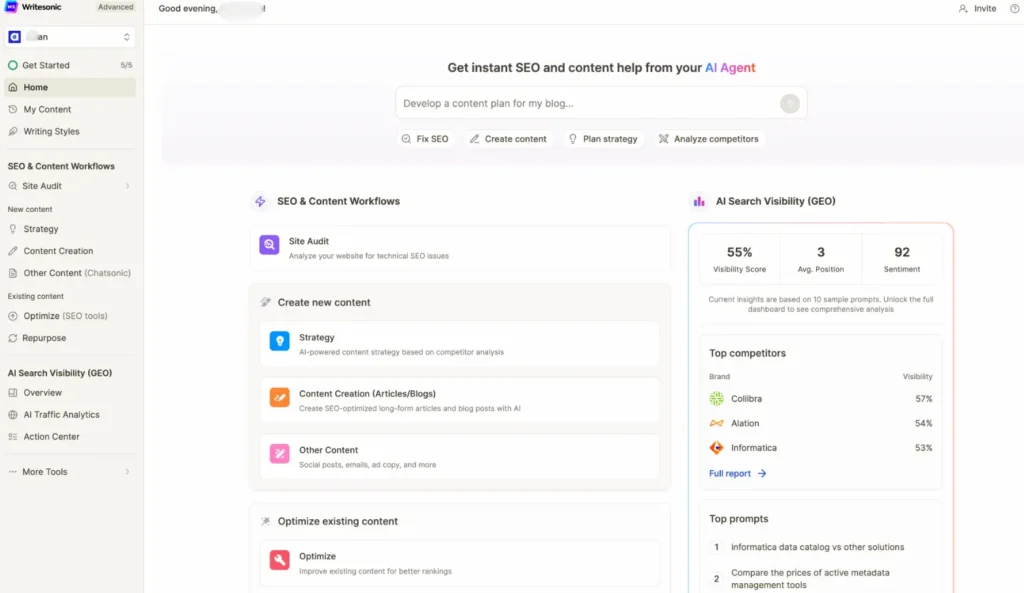
First, log into your Writesonic account. On your main dashboard workspace, navigate to the middle section under Create new content.
Click directly on Content Creation (Articles/Blogs) (indicated by the orange pen icon).
Pro Tip: Do not use the general chat window for long-form articles. Going through the dedicated Content Creation pipeline activates Writesonic’s specialized long-form writing agents, giving you much higher structural quality.

Step 2: Choose Your Writesonic Writing Mode
Once inside the Content Creation interface, you will be presented with specialized blogging pathways designed for different time constraints and depth requirements:
- Instant Article: Best for breaking news or quick, straightforward topics where speed is your absolute priority.
- AI-Ready Article (Recommended): This is the sweet spot for a 2,000-word powerhouse. This mode analyzes real-time SERP (Search Engine Result Pages), pulls internal data, and crafts an in-depth article outline based on what is currently ranking on Google.
Click “Click to start“ under the AI-Ready Article option.
Step 3: Feed the Writesonic AI Your Keywords and Intent
Now, it is time to give the AI its marching orders. Writesonic requires just a few basic inputs to ensure it doesn’t hallucinate data:
- Topic/Title: Enter your core topic (e.g., “Best Productivity Tools for Remote Teams”).
- Keywords: Paste your target SEO keywords. Writesonic will strategically place these in your H2/H3 headers and body text to maximize your on-page SEO score.
- Reference Links (Optional but highly recommended): You can drop 1-2 URLs of competitor articles that you want to outrank. The AI Agent will read those pages to ensure your article covers everything they did—and more.
Step 4: Generate, Refine, and Publish with Writesonic
Click the generate button, and watch the magic happen. Within about 60 seconds, Writesonic will build a complete, logically structured, 2,000-word draft.
Before you copy it over to WordPress, spend 2 minutes reviewing the final output:
- Check the Fact-Checking Citations: Look over the real-time data integration to ensure any statistics cited are perfectly aligned with current facts.
- Review the SEO Score: Check the built-in SEO optimizer panel on the side to see your readability metrics and keyword density score.
- Inject Your Brand Voice: Use Writesonic’s inline editor to quickly tweak the tone if an intro or conclusion needs a bit more of your unique personality.

Summary Timeline: The 5-Minute Breakdown
| Time Spent | Action Item | What Happens |
| Minute 0 – 1 | Setup | Open Writesonic, go to Content Creation workflow. |
| Minute 1 – 2 | Input | Enter your title, target keywords, and competitor URLs. |
| Minute 2 – 3 | AI Generation | Sit back while the AI processes live Google data and writes. |
| Minute 3 – 5 | Quick Polish | Scan headers, verify metrics, and push to your blog! |
Ready to Scale Your Content?
Writing long-form content doesn’t mean you have to stare at a blank Google Doc for hours anymore. By leveraging dedicated SEO frameworks like Writesonic, you can act as a strategic editor rather than an exhausted writer—allowing you to scale your traffic and build content clusters in record time.
If you want to try this workflow yourself, you can set up a free project workspace on Writesonic today and get instant access to their automated SEO tools.
Recent Post:
How to Use Simvoly: Step-by-Step Guide for Beginners (2026 Edition)
Systeme.io Review 2026: Does This All-in-One Platform Really Replace 5 Expensive Tools?