

Table of Contents
If you have spent even ten minutes browsing round-ups of the best AI productivity tools this year, you have almost certainly seen Gamma AI mentioned near the top of the list. As a workplace productivity specialist who tests these platforms for a living, I wanted to look past the hype and evaluate what Gamma AI actually delivers for professionals who need to create presentations, documents, and web pages faster without sacrificing design quality.
This article breaks down what Gamma AI is, how it works, its core features, pricing, and who genuinely benefits from adding it to their toolkit — so you can decide, with confidence, whether it deserves a spot in your own productivity stack.
What Is Gamma AI and Why It Belongs on This List
Gamma AI is an AI-powered content creation platform that turns a simple text prompt, outline, or existing document into a fully designed presentation, one-pager, or website in a matter of minutes. Rather than forcing users to build slides one at a time, Gamma AI interprets the intent behind a prompt, structures the content logically, and applies professional layouts automatically. That combination of speed and design sense is exactly why it consistently earns a place among the top AI productivity tools recommended by consultants, marketers, educators, and startup founders alike.
Unlike traditional slide software that treats AI as a bolt-on feature, Gamma was built AI-first. This means the entire workflow — from ideation to polished output — is optimized around a conversational, prompt-driven experience rather than manual drag-and-drop design.
Gamma.app Review 2026: The Definitive Guide to the AI Presentation Tool Everyone Is Talking About
How Gamma AI Works
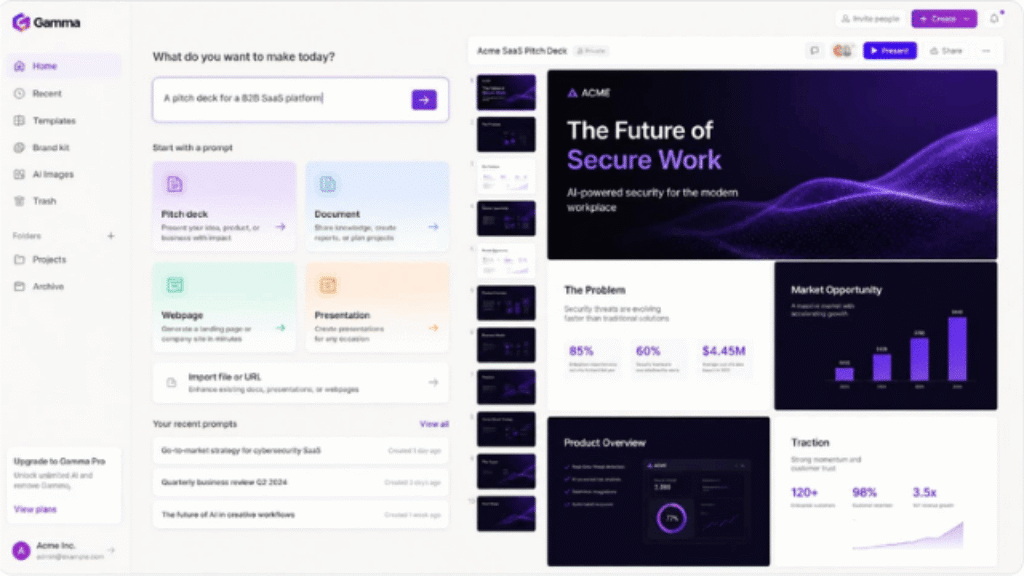
The typical workflow is refreshingly simple. A user types a topic, pastes an outline, or uploads a document (such as a PDF or Word file), and Gamma’s engine generates a structured draft made up of individual content “cards.” From there, users can regenerate specific sections, swap themes, adjust tone, or hand editing control to Gamma’s built-in AI agent, which can independently expand content, restructure sections, or apply brand guidelines in bulk.
Key Features That Set Gamma AI Apart
What distinguishes Gamma from a typical slide generator is the breadth of its feature set. Below are the capabilities that most influence day-to-day productivity.
AI-Generated Decks in Seconds
Gamma can produce a full first draft of a presentation, often within 30 to 60 seconds, complete with headlines, body copy, imagery, and layout. This alone eliminates the single biggest time sink in presentation work: staring at a blank slide.
Beyond Slides: Docs, Webpages, and Social Content
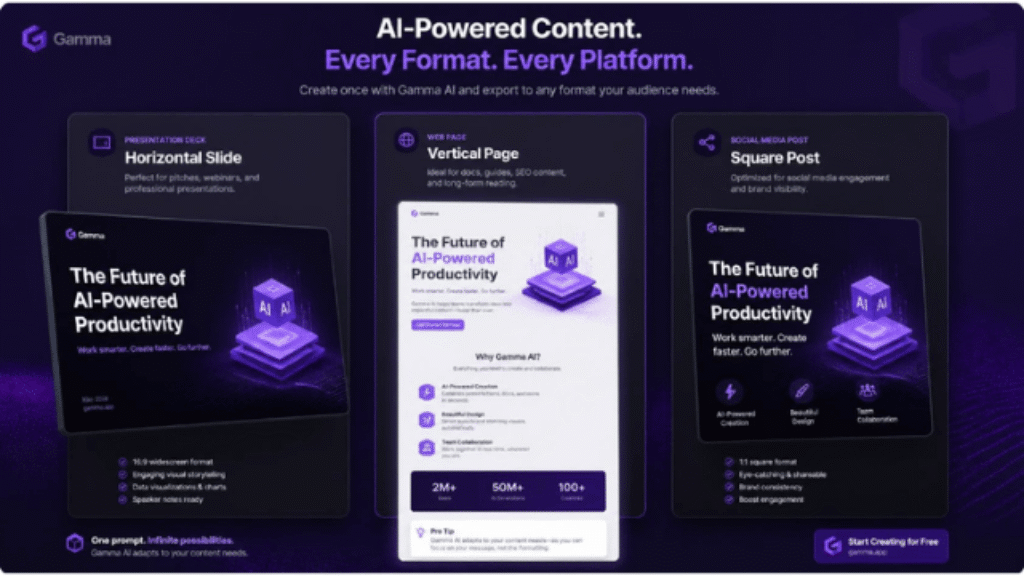
Gamma is not limited to decks. The same engine can generate standalone documents, simple websites, and social media graphics, which makes it useful well beyond the boardroom — think internal memos, landing pages, or one-off marketing assets.
A Smart, Consistent Design Engine
Every card generated by Gamma automatically follows a coherent visual system: consistent fonts, spacing, and color palettes. Paid tiers unlock custom branding, fonts, and the ability to remove Gamma’s watermark entirely, which matters for anyone sending client-facing materials.
Real-Time Collaboration and Easy Sharing
Teams can co-edit a project in real time, leave comments, and share a live link instead of a static file. Finished work can be exported to PDF, PPTX, or PNG, or published directly as a web page — a flexibility most legacy presentation tools still lack.
Gamma AI Pricing: What You Actually Pay For
Gamma follows a freemium model, and the free plan is genuinely usable rather than a stripped-down trial. That said, pricing tiers and credit allowances have shifted over recent updates, so always confirm the current numbers on Gamma’s official pricing page before purchasing. As a general guide:
- Free — a one-time allotment of AI credits, Gamma branding included, ideal for testing the platform on a handful of projects.
- Plus — a low monthly cost (roughly single digits to around ten dollars when billed annually) that removes branding and adds more monthly credits, aimed at individual professionals.
- Pro — a mid-tier plan for consultants and agencies, unlocking premium AI models, custom branding and fonts, analytics, and API access.
- Team / Business / Ultra — higher-capacity plans built for organizations that need shared credit pools, admin controls, and enterprise-grade security.
For most solo professionals and small teams, the free or Plus tier is enough to validate real productivity gains before committing to a larger budget.
Who Gets the Most Value From Gamma AI
Gamma AI is particularly well suited to people who create presentation-style content frequently but do not have time — or design training — to build it from scratch.
- Startup founders who need investor-ready pitch decks on tight deadlines.
- Consultants and agencies producing client proposals and reports at volume.
- Teachers and trainers building lesson materials or workshop slides.
- Marketing teams repurposing one piece of content into decks, one-pagers, and social assets.
- Anyone who simply wants a polished result without opening a design tool.
Gamma AI vs. Other AI Productivity Tools
Compared with tools like Canva’s AI features, Beautiful.ai, or PowerPoint with Copilot, Gamma’s biggest advantage is generation speed combined with true format flexibility — one prompt can output a deck, a document, or a webpage. Canva still leads on raw graphic-design depth, and PowerPoint with Copilot integrates more tightly into existing Microsoft workflows, but for pure speed-to-first-draft, Gamma AI is difficult to beat, which is precisely why it keeps appearing on lists of the top AI productivity tools rather than niche design roundups.
Pros and Cons of Gamma AI
- Extremely fast first drafts, often ready in under a minute.
- Generous free plan that doesn’t expire, unlike many time-limited trials.
- Flexible output: presentations, documents, and websites from one platform.
- AI agent can independently expand or restructure content from uploaded files.
- Clean, consistent design with minimal manual formatting required.
- Deep, pixel-level design customization is more limited than dedicated design tools.
- Exported files occasionally need minor manual adjustment in PowerPoint.
- Card-based structure can feel restrictive for highly non-linear content.
Final Verdict: Is Gamma AI Worth Adding to Your Toolkit?
For anyone who regularly produces presentations, proposals, or quick web pages, Gamma AI earns its reputation as one of the top AI productivity tools available today. It will not replace a professional designer working on a flagship brand deck, but for the 90 percent of everyday business content that simply needs to look sharp and ship fast, it is one of the highest-leverage tools you can add to your workflow this year.
TRY GAMMA AI FOR FREE AND BUILD YOUR FIRST AI-POWERED PRESENTATION TODAY