


Table of Contents
The way we build presentations, documents, and even simple websites is undergoing its biggest shift since PowerPoint was invented in 1987. A new generation of AI-native design tools has emerged to kill the single most hated part of the creative process: formatting. At the center of this shift sits Gamma.app, a tool that has grown from a niche YouTube-and-Twitter favorite into one of the most talked-about SaaS products in the productivity space. This Gamma.app review exists because the market is now flooded with “AI slide generators,” and most of them are thin wrappers around a single prompt box. Gamma is different enough — and popular enough — that it deserves a serious, no-fluff evaluation.
Over the course of this review, we’ll dissect exactly what Gamma.app is, how its underlying AI actually works, what its core features look like in practice, where it beats (and loses to) tools like PowerPoint, Google Slides, Canva, and Notion, what its 2026 pricing structure really costs you month to month, and — most importantly — who should (and shouldn’t) build their workflow around it. If you’re trying to decide whether to trust your next pitch deck, sales one-pager, or internal report to an AI, this is the analysis to read before you commit.
What is Gamma.app?
Gamma.app is a cloud-based, AI-powered content creation platform that generates presentations, documents, and simple websites from a text prompt, an outline, or an existing file. Instead of forcing users to manually place text boxes, resize images, and align objects pixel by pixel — the way legacy tools like PowerPoint or Keynote do — Gamma treats every project as a series of flexible “cards.” Each card is a self-contained block of content that the AI can populate, restyle, and rearrange automatically, while still giving the user full manual override at any point.
At its core, Gamma is built on large language models similar in spirit to the ones powering ChatGPT and Claude, paired with a proprietary layout engine. This combination lets the platform do two things simultaneously that traditional design software can’t: generate the content (headlines, bullet points, speaker notes, even images) and generate the layout (grid structure, spacing, typography, color palette) in a single pass. The result reads less like a slide deck assembled with templates and more like a document a skilled designer laid out by hand — minutes after a human typed a one-line prompt.
This matters because it fundamentally changes the creative bottleneck. In a traditional workflow, writing the content and designing the deck are two separate skill sets and two separate time sinks. Gamma collapses them into one step, which is precisely why so many marketers, founders, consultants, and educators are searching for a trustworthy Gamma.app review before switching their entire workflow over.
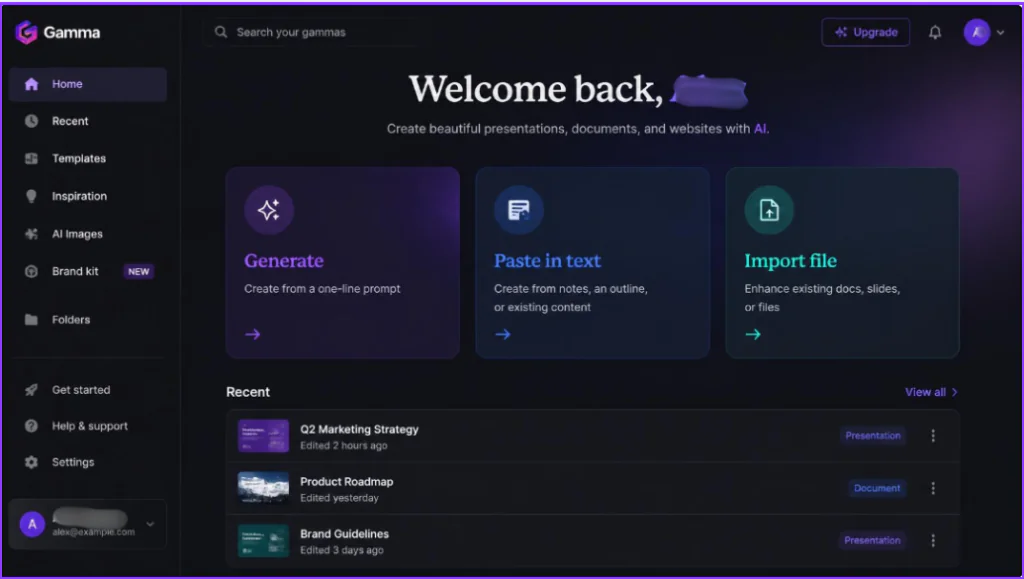
Core Features and How Gamma.app Works
Gamma’s feature set is built around a single philosophy: reduce every manual design decision to an optional one. Below is a breakdown of the platform’s four pillars.
AI-Powered Content and Layout Generation
The core workflow starts with one of three inputs: a short prompt describing the topic, a pasted outline or block of raw text, or an uploaded file (a PDF, Word document, or even an existing PowerPoint). Gamma’s AI then drafts a full outline, which the user can edit card-by-card before generation. Once approved, the engine writes the copy for every card and simultaneously assigns a layout — image-left, statistic-callout, timeline, comparison grid, and dozens of other patterns — based on the type of content in that section.
Unlike a static template system, this layout logic is adaptive: paste in three bullet points and Gamma might generate a clean three-column layout, but paste in a paragraph of dense analysis and it will switch to a text-heavy, single-column card instead. This adaptive behavior is the single biggest technical differentiator that separates Gamma from template-based tools like Canva or SlidesGo.
Interactive Cards, Embeds, and Multimedia Integration
Because a Gamma project lives natively on the web rather than as a static file, cards can embed live content: YouTube videos, Figma files, Google Sheets, Loom recordings, Airtable bases, interactive charts, and website iframes can all be dropped directly into a card. This turns a Gamma presentation into something closer to an interactive micro-website than a slide deck — a viewer can click into an embedded spreadsheet or scroll through a live product demo without ever leaving the presentation.
Native AI image generation is built directly into the editor as well, meaning users don’t need to leave Gamma to source visuals — a major time-saver compared to the traditional cycle of searching stock photo sites, downloading, and re-uploading assets into PowerPoint or Google Slides.
Themes, Customization, and Styling Options
Gamma ships with a large library of professionally designed themes covering different tones — corporate, playful, minimalist, editorial — and every theme can be customized down to the font pairing, color tokens, corner radius, and spacing rules. On paid plans, teams can lock in a custom brand kit (logo, brand colors, approved fonts) so that every deck generated by every team member automatically inherits consistent branding, which solves one of the most common pain points in distributed marketing teams: brand drift.
Manual editing remains fully available at every step. Users can drag-resize elements, swap layouts card-by-card, or rewrite AI-generated copy directly, meaning Gamma functions equally well as a “generate everything” tool or a “give me a strong first draft” tool.
Analytics and Sharing Capabilities
Because every Gamma project is published as a live, hosted link rather than a downloadable file, the platform includes built-in analytics on paid tiers: view counts, time spent per card, and drop-off points, similar to the kind of engagement data typically reserved for email marketing platforms. This is particularly valuable for sales teams sending pitch decks or proposals, since it reveals whether a prospect actually opened the deck and which section held their attention the longest — data that a PDF or a PowerPoint attachment simply cannot provide.
Sharing options include public web links, password-protected links, embedded iframes for company websites, and traditional exports to PDF, PPTX, or PNG for offline use — though full exports are gated behind paid plans.

Pros and Cons of Gamma.app
No tool is perfect for every use case, and an honest Gamma.app review has to weigh the genuine strengths against the real friction points users report.
- Dramatic speed advantage: A rough, presentable draft that would take 1-3 hours in PowerPoint can be produced in under 5 minutes, which is transformative for anyone operating under tight deadlines.
- Design quality without design skill: The adaptive layout engine consistently outputs visually coherent results, closing the gap between people who can design and people who can’t.
- True web-native format: Interactive embeds, live data, and clickable links make Gamma presentations functionally richer than static slide decks.
- Built-in engagement analytics: Sales and marketing teams gain visibility into how recipients actually interact with shared content — something PowerPoint and Google Slides don’t offer natively.
- Multi-format flexibility: The same core engine builds presentations, one-page documents, and simple landing-page-style websites, reducing the need for separate tools.
- Fast iteration loop: Because content and layout are decoupled from manual placement, revising a deck after feedback is a matter of editing text, not re-dragging boxes.
- Credit-based pricing creates unpredictability: Unlike flat per-seat SaaS pricing, Gamma meters usage through AI credits, meaning heavy users can burn through a plan’s allowance faster than expected and face awkward top-up purchases.
- Free plan credits never refresh: The 400 starter credits are a one-time allotment, not a monthly grant, which makes the free tier feel more like a trial than an ongoing free plan.
- Offline and native file control is weaker: Power users of PowerPoint who need granular pixel-level control, complex custom animations, or full offline editing will find Gamma’s web-first model more restrictive.
- Learning curve for advanced customization: While the AI defaults are strong, achieving a very specific, non-standard brand look sometimes requires more manual fighting with the layout engine than starting from a blank canvas would.
- Mixed public sentiment on billing: Independent review aggregators show a split reputation — enthusiastic praise on platforms like G2 alongside a notably rockier record on consumer complaint sites, often tied to credit consumption and refund policy confusion.
- Export fidelity varies: PDF and PPTX exports don’t always perfectly preserve every interactive element or animation, since those features are native to the web format Gamma was built around.
Gamma.app Pricing Plans: Is It Worth It?
Gamma runs on a freemium, credit-metered pricing model rather than a traditional flat-fee SaaS structure. Every action that touches the AI — generating an outline, writing card copy, creating an AI image — consumes credits, and each pricing tier grants a different monthly (or one-time, in the Free tier’s case) credit allowance. Based on Gamma’s published pricing and third-party tracking as of 2026, here is how the tiers break down:
| Plan | Price (annual billing) | Monthly AI Credits | Key Unlocks | Best For |
| Free | $0 | 400 one-time (never refills) | Core AI generation, PDF/PPTX/PNG export, but watermarked | Testing the tool, one-off decks, students |
| Plus | ≈$9/seat/mo | 1,000/month | Watermark removed, ~20-75 cards per prompt, basic brand kit | Freelancers, solo creators, occasional use |
| Pro | ≈$18/seat/mo | 4,000/month | Premium AI image models, custom fonts/branding, analytics, API access | Marketers, consultants, agencies, regular users |
| Ultra | ≈$90/seat/mo | 20,000/month | Most advanced AI models, highest generation ceiling | Power users with heavy AI image/video needs |
| Team | ≈$20/seat/mo (2-seat min., annual only) | Shared pool, ~6,000/seat | Shared workspace, company theme, centralized billing | Small teams needing consistent branding |
| Business | ≈$40/seat/mo (10-seat min., annual only) | Shared pool, ~10,000/seat | SSO, SOC 2 documentation, highest usage ceiling | Larger organizations with security requirements |
Note: exact list prices fluctuate slightly by billing cycle (monthly vs. annual) and occasional promotions, and third-party trackers report modest variation — always confirm the live figure on Gamma’s official pricing page before purchasing.
Is Gamma.app worth paying for?
For individuals producing a handful of high-stakes documents per month — a pitch deck, a client proposal, a board update — the Plus or Pro tier pays for itself almost immediately in time saved. At roughly $9-$18 per seat monthly, Gamma undercuts several competitors like Beautiful.ai and Canva Pro on entry price while offering a more automated generation experience.
Where the economics get less favorable is for high-volume users who generate dozens of decks or images per month — the credit-metering system means costs can climb faster than a flat-rate competitor, and unplanned credit top-ups (billed separately) can make the true monthly cost harder to predict than the advertised sticker price suggests. Teams evaluating Gamma at scale should model their expected monthly credit consumption before committing to an annual Team or Business contract.

Who Should Use Gamma.app?
Gamma is not a one-size-fits-all replacement for every document tool on the market — it excels for specific workflows and specific types of creators. Based on the feature set and pricing structure above, the tool is the strongest fit for:
- Marketers and Content Creators: who need to turn campaign briefs, reports, and social content into polished visual assets quickly, without waiting on a design team.
- Startup Founders and Sales Teams: who send pitch decks and proposals frequently and benefit directly from built-in view analytics to track prospect engagement.
- Consultants and Freelancers: who need to produce client-ready deliverables fast and want consistent, professional design without hiring a designer.
- Teachers and Educators: building lecture slides, course outlines, or student handouts, where speed and clarity matter more than pixel-perfect custom branding.
- Product and Project Managers: who need to turn meeting notes or specs into shareable, easy-to-digest internal documents and roadmaps.
Conversely, professional designers who require frame-perfect custom animation control, enterprises with strict offline/on-premise requirements, and extremely high-volume agencies generating hundreds of assets monthly may find that a combination of PowerPoint/Keynote plus a human design workflow, or a flat-rate competitor, better suits their scale and control requirements.
Final Verdict & Conclusion on Gamma.app
This Gamma.app review arrives at a clear conclusion: Gamma is one of the most genuinely useful applications of generative AI to hit the productivity software market in recent years — not because it replaces human creativity, but because it eliminates the mechanical busywork that used to stand between an idea and a polished, shareable deliverable. Its combination of adaptive AI layout generation, native web interactivity, and built-in analytics gives it real, structural advantages over PowerPoint, Google Slides, and even most AI-adjacent competitors like Canva or Beautiful.ai.
The trade-offs are real, too: the credit-based pricing model demands more careful budgeting than a flat subscription, and users who need deep offline control or frame-perfect custom design will still reach for traditional tools. But for the large majority of professionals whose goal is simply to communicate an idea clearly, quickly, and attractively, Gamma.app delivers on its promise. If your current workflow still involves manually dragging text boxes around a slide at 11 p.m. before a big meeting, Gamma is worth testing on your very next project.
Ready to Experience It Yourself?
Reading about Gamma’s speed and design quality only tells half the story — the real test is generating your own first deck and seeing how it compares to your current workflow.
RECENT POST
Prelaunch.com Saves From Burning Cash: A Financial Risk Breakdown for Hardware Founders
Prelaunch Review 2026: An Expert’s Honest Look at the Product Validation Platform