

Table of Contents
If you’ve spent even one afternoon comparing Zapier vs Make, you already know the marketing pages won’t tell you what you actually need to know: which one saves you real hours every week without draining your budget. As a solopreneur, you don’t have a dev team to babysit broken workflows, and you don’t have the margin to overpay for automation you barely use.
I’ve run both platforms across real client workflows — lead capture, content publishing, invoice reminders, CRM syncing — and the honest answer is that Zapier and Make aren’t really competing for the same job. One is built to get you moving in minutes. The other is built to save you serious money once your automations get complex. This breakdown shows you exactly where each one wins, what they cost at real usage volumes, and which one you should be using right now.
Zapier vs Make: Two Different Design Philosophies
Before comparing features line by line, it helps to understand why Zapier vs Make even feels like a hard decision: the two platforms were built to solve different problems.
Zapier was designed around simplicity. You pick a trigger, pick an action, and it works in a straight line — great when you want a workflow live in under five minutes and you’re not thinking about the underlying logic. Make (formerly Integromat) was designed around visibility and control. It gives you a visual canvas where you can see every branch, filter, and router in a workflow, which matters the moment your automation stops being a straight line and starts involving conditions, loops, and multiple data paths.
In short: Zapier optimizes for speed of setup. Make optimizes for depth of control. Neither is “better” in a vacuum — it depends entirely on how complex your workflows are and how much time you’re willing to spend building them.
Interface, Learning Curve, and Integrations: A Side-by-Side Look
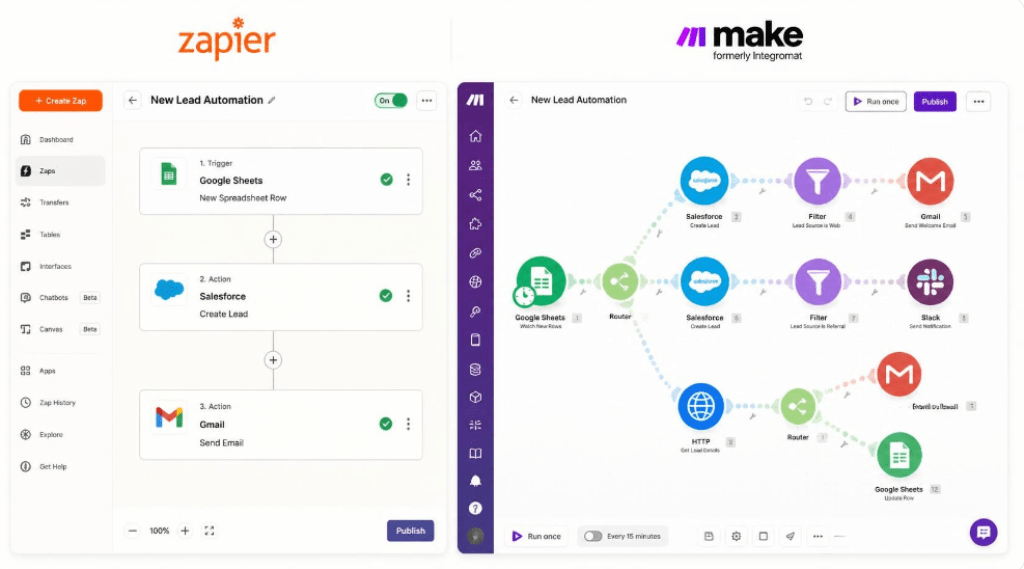
Zapier’s interface is close to foolproof. You’re guided step by step, the app library is enormous (over 9,000 integrations, more than any competitor), and most solopreneurs can build their first working Zap in under 10 minutes without watching a single tutorial.
Make’s canvas is more powerful but has a real learning curve. You’re not filling out a form — you’re building a flowchart. That means Make can express logic Zapier simply can’t (multiple branches from one trigger, error-handling routes, built-in data transformation tools) but it takes longer to feel confident using it. Expect a weekend of tinkering before your first complex scenario feels natural.
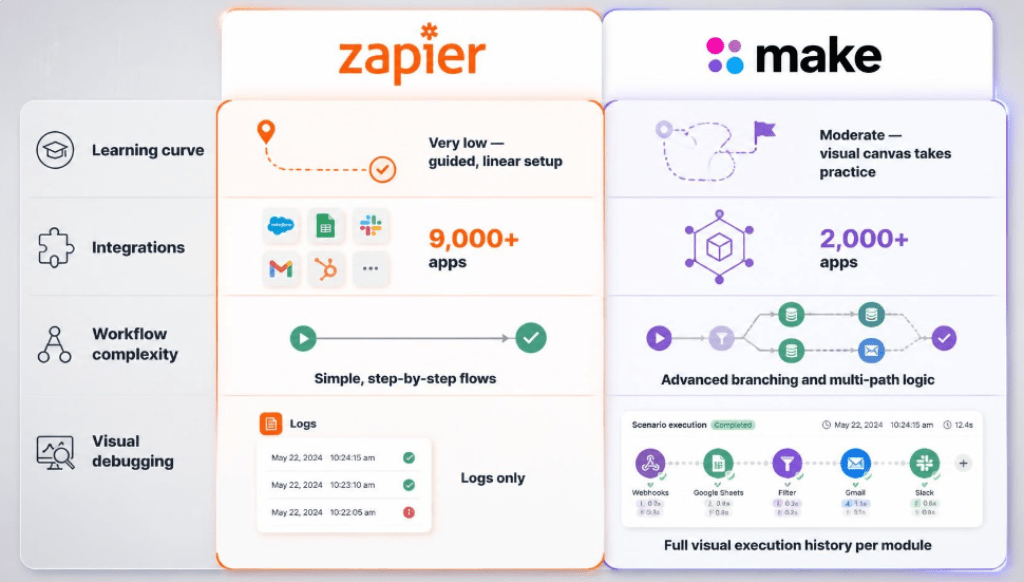
| Criteria | Zapier | Make |
| Learning curve | Very low — guided, linear setup | Moderate — visual canvas takes practice |
| Integrations | 9,000+ apps, broadest coverage | 2,000+ apps, strong on technical/dev tools |
| Workflow complexity | Best for simple, linear automations | Best for branching, conditional logic |
| Visual debugging | Limited — logs only | Full visual execution history per module |
Zapier vs Make Pricing in 2026: What You Actually Pay at Real Task Volumes
This is where the decision usually gets made — and where most comparison articles fail you, because sticker prices don’t tell the real story. Zapier bills by “tasks” (each action a Zap performs). Make bills by “operations” or credits (each module a scenario runs). The two units aren’t equivalent: a single Zapier task can equal several Make operations, so you can’t compare the headline numbers directly. You have to compare them at the volume you’ll actually use.
Estimated Cost at ~1,000 Tasks/Operations per Month
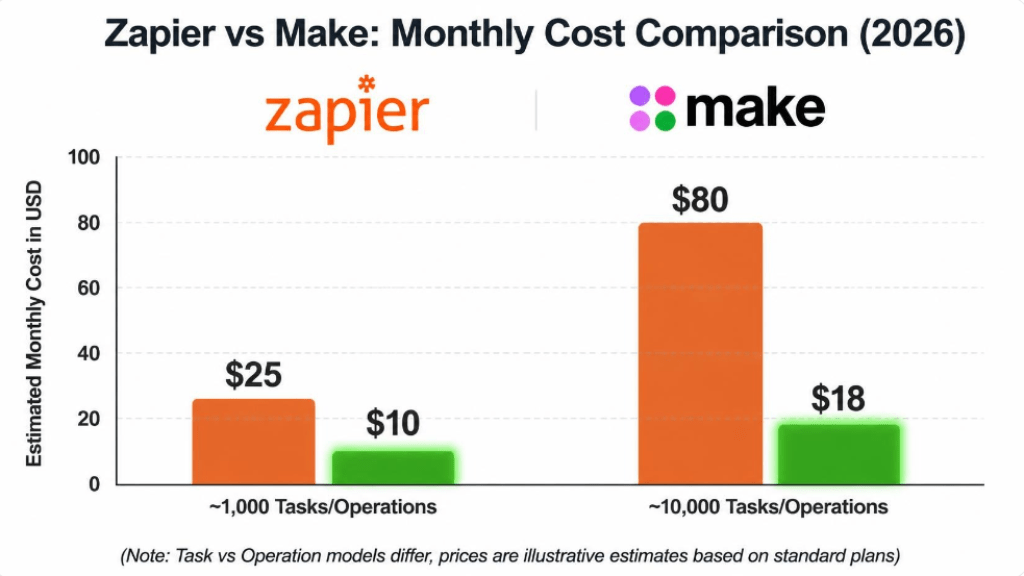
At this volume — typical for a solopreneur running 3–6 active automations — Zapier’s free plan (100 tasks) won’t cover you, so you’re looking at the entry paid tier, roughly $19.99–$29.99/month for around 750 tasks. Make’s free plan already covers 1,000 operations/month, and if you outgrow it, the Core plan starts around $9–$12/month for 10,000 operations — enough headroom to more than triple your usage before paying more.
At this stage, Make is consistently the cheaper option, often by 2–3x for equivalent output.
Estimated Cost at ~10,000 Tasks/Operations per Month
Once you’re running automation at real scale — multiple client accounts, e-commerce order flows, multi-step content pipelines — the gap widens further. Zapier at this volume typically lands you on the Team plan, starting around $69–$103/month for roughly 2,000 tasks (you’ll likely need to purchase additional task blocks). Make’s Core or Pro plan, by contrast, is built for exactly this volume at roughly $12–$21/month.
Multiple independent pricing analyses in 2026 put Make at 3–5x cheaper than Zapier for equivalent automation volume — the trade-off being the steeper learning curve covered above. Pricing on both platforms changes periodically, so always check the current rates before committing to an annual plan.
Pros and Cons of Each Platform
Zapier
- Largest app ecosystem on the market — if a tool has an API, Zapier probably connects to it
- Fastest to set up; ideal when you need a workflow live today
- Strong documentation and community templates for almost any use case
- Reliable customer support, even on lower-tier plans
- Gets expensive fast once your task volume grows
- Limited visibility into why a multi-step Zap failed
- Complex branching logic is clunky compared to Make’s canvas
Make
- Significantly cheaper per operation at almost every volume tier
- Visual canvas makes complex, branching logic actually manageable
- Built-in data transformation tools reduce the need for extra apps
- Full execution history per module — easier to diagnose failures
- Steeper learning curve for non-technical users
- Smaller app library than Zapier, particularly for niche SaaS tools
- “Operations” pricing can be harder to estimate up front than Zapier’s task model
Which Should You Choose Based on Your Use Case?
Choose Zapier If…
- You need a workflow running in the next 15 minutes, not this weekend
- Your automations are simple and mostly linear (Trigger → Action)
- You rely on a niche app that only Zapier supports
- You’d rather pay more for convenience than spend time learning a new interface
Choose Make If…
- You’re running (or plan to run) more than 5–10 active automations
- Your workflows involve conditions, branches, or multi-path logic
- You’re automating for multiple clients and need to control costs at scale
- You’re comfortable investing a few hours upfront to save money long-term
Final Verdict: Zapier vs Make for Solopreneurs
If you had to pick one system today with zero automation experience and a workflow that needs to work by tomorrow, Zapier is still the safer starting point. But if you’re a solopreneur trying to protect your margins as you scale — juggling multiple clients, multiple tools, and workflows that are only getting more complex — Make is very likely the smarter long-term investment. The few hours you spend learning the canvas will pay for themselves within your first billing cycle.
The good news: you don’t have to guess. Both platforms offer a free plan, so the fastest way to make this decision is to rebuild one real workflow on each and compare the experience yourself.
RECENT POST:
Beehiiv vs Kit : The In-Depth Comparison to Help You Pick the Right Newsletter Platform
Beehiiv Review: An Analytical Breakdown of the Newsletter Platform Built for Growth (2026)
From Blog to Inbox: How to Connect Jasper AI and Brevo for an Automated Content Funnel